

Enterprise RAG: 5 mistakes that show up after the POC
An enterprise RAG is relatively easy to prototype. Making it a useful, stable product is a much bigger challenge. Here are the five most common production pitfalls—and how to get ahead of them.
A RAG (Retrieval-Augmented Generation) is an architecture that lets an AI search your internal sources before answering: documents, knowledge bases, procedures, contracts, sometimes databases or the web. If the topic is new to you, start with our doc page on Data and RAG.
Enterprise RAG is often deceptively easy to set up.
In a few hours you can have a compelling first demo. You pick ten well-chosen documents, run them through a pipeline, and the assistant already answers questions that feel like real use cases.
Picture an HR team testing an internal assistant. You give it the staff handbook, the collective agreement, three leave policies, two notes on remote work, and an FAQ. An employee asks: "How many remote-work days can I take per week?" The assistant finds the right passage, synthesizes the answer, cites the source. Everyone smiles. The POC is approved.
Then comes production.
You are no longer answering ten questions over ten clean documents. You have to absorb thousands of files, multiple conflicting versions, access rights, product names, customer references, tables, scanned documents, internal jargon, and busy users who rarely phrase requests like in a demo.
No wonder 95% of enterprise AI projects fail.
Here are five mistakes we see regularly with our customers.
Mistake #1: treating the POC as reality
RAG’s first trap is how easy it looks.
For a demo the path is short: pick a small corpus, convert files, chunk text, compute embeddings, retrieve relevant snippets, then generate an answer.
That chain works fast when documents are clean and the topic is narrow. A production system does not work in a staged setting.
In a real company, documents are rarely uniform. You have PDFs exported from Word, slide decks, Excel spreadsheets, screenshots, tickets, contracts, meeting notes, and often files no one can really trace.
The problem is not just volume. It is diversity, document status, and inconsistency across sources. A 2023 procedure can still be semantically relevant but superseded by a 2026 note. A client contract can include an exception that contradicts the general rule. A sales slide can simplify a product that technical documentation describes differently.
You also have to "teach" the model the company vocabulary: internal acronyms, product nicknames, project names, business abbreviations, old names people still use. Without that work, the assistant may search the wrong place or miss information that is actually there.
Enterprise knowledge is not a pile of files. It is a set of sources, versions, rights, priorities, and shared vocabulary.
To go to production, you need to decide which version is authoritative, which files to ignore, which rights to apply, how to handle contradictions, and how to cite sources. That sounds like admin work. In practice, it drives trust.
Mistake #2: depending on a single AI vendor
Companies expect an internal tool to be available, fast, and stable. The implicit reference is often mature SaaS: 99.99% uptime, predictable response times, few visible glitches.
With AI models, that expectation collides with a harsher reality. Vendors are powerful, but they do not always behave like classic infrastructure. Latency varies, some requests fail, models can be temporarily unavailable, performance shifts with load, region, or internal updates.
At ATG we continuously measure API response times across many AI providers. The benchmark below compares success rates for several providers on text-generation tasks.
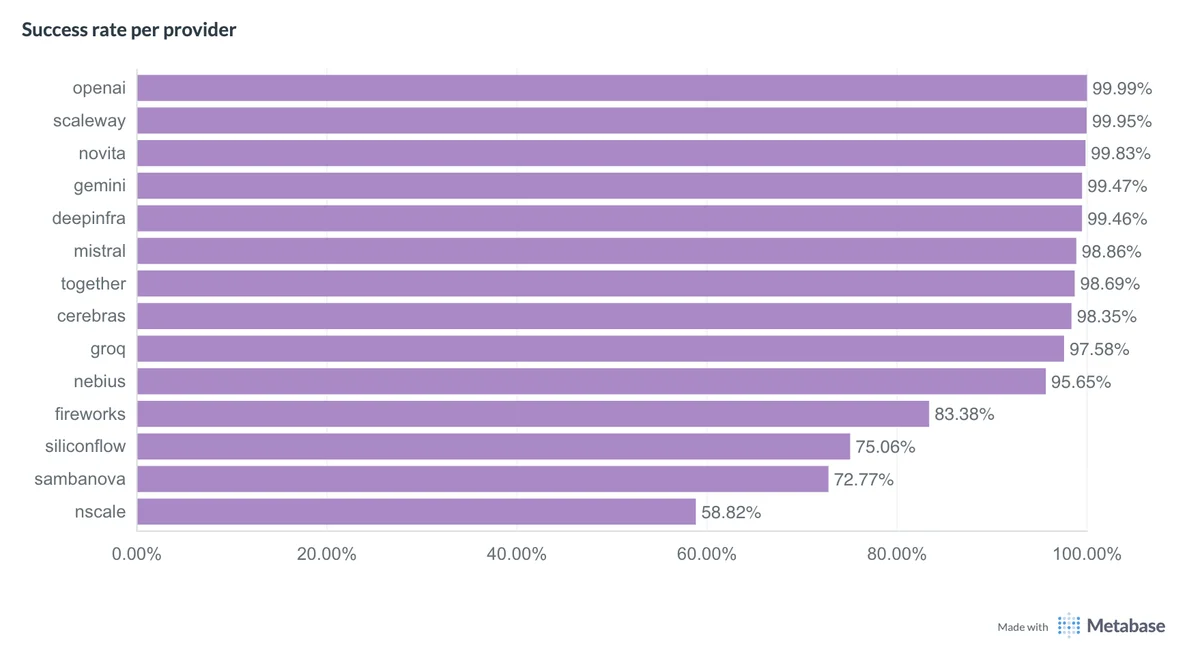 ATG Q1 2026 benchmark: text generation success rates by provider
Caution: this chart only shows success rate. It says nothing about latency. A provider can show an excellent success rate but still be too slow for a good user experience (notably OpenAI).
The takeaway is simple: if your RAG depends on a single AI vendor and a single model, the whole user experience depends on that one layer.
A better approach is to design for rerouting:
- several AI providers for the same class of task;
- several models depending on question complexity;
- fallback paths when a request fails;
- monitoring for latency, errors, and quality;
- dynamic selection of the best-fit model.
Mistake #3: thinking you can just deploy your own AI model
Then the fix sounds simple: deploy your own model.
On paper it is appealing. You reduce external dependency, you control infrastructure, you keep a tighter grip on your data. And if RAG returns the right snippets, the model only has to write the answer—right?
Not really.
Real user queries are rarely clean. A user does not ask:
What is the procedure for validating paid leave?
They ask something more like:
uhh so Sophie on support wants to take 3 days off right before the rush, she’s already kind of maxed it this quarter no? can we say no or how do we even handle that
The system must understand the request, find the right texts, tell general policy from edge cases, avoid rubber-stamping a biased management take, and produce wording people can use.
Search brings the sources. The model still has to reason.
On-prem can make sense for narrow cases: simple extraction, rephrasing, classification, factual RAG in a small domain. But as soon as the assistant must handle ambiguous business questions, cross several sources, or use tools, stronger models are hard to avoid.
We covered this in our article on on-prem LLMs. The key point: running a robust model with good performance is expensive, especially with many concurrent users.
So the right strategy is not a one-time choice of cloud vs. on-prem, small vs. large model. It is smart routing: a light model for simple tasks, a heavier one for complex reasoning, a specialized model for embeddings or vision, an alternate provider when the first is slow.
Mistake #4: relying on vector search alone
Many RAG projects start with pure vector search. That makes sense: embeddings are at the heart of modern RAG, and semantic search is impressive.
It can find a passage even when the user’s words do not match the document. "Remote work policy" can match "arrangements for working from home." "How do I report an absence?" can match "sick leave procedure."
But companies handle huge amounts of information that does not have a universal semantic meaning.
A customer name, a product code, a project ID, a contract number, an internal acronym, or a colleague’s name does not "mean" much to an embedding. ACME-0427, Project Atlas, PRD-19-B, John Smith, or Horizon Pack are keys—not concepts.
If your RAG is built only on semantic proximity, you risk missing exactly what users are looking for.
That is why a solid RAG combines (at least) semantic search, keyword search, metadata, and source prioritization by reliability.
The RAG must also learn to arbitrate between conflicting documents: date, owner, status, scope, official source, contractual exception. Otherwise it is not answering from "enterprise knowledge." It is answering from a pile of files.
A good RAG does not just find a nearby passage. It finds the right passage, in the right document, with the right level of authority.
Mistake #5: thinking users only want to search
The last trap is often discovered too late: users do not only want to search.
At first they are impressed by an assistant that answers from internal documents. Then, very quickly, they want more:
- "Can you draft a Word summary for me?"
- "Go check if this is still true on the internet."
- "Compare this procedure with the client’s contract."
- "Email me the summary."
- "Search the CRM."
- "Give me a usable table."
In other words, they do not see the tool as "just a RAG." They see it as a work interface.
If your solution can only do document search, usage will hit a ceiling fast. That is where agentic architectures, tools (web search, document generation, etc.), and protocols like MCP matter.
But adding tools is not enough. You also need a smooth interface, integrated with existing habits where possible, and clear enough that users know what the assistant can do.
Finally, you need measurement. A RAG system is not validated with five questions in a project meeting. It is validated with hundreds, then thousands, of representative questions: simple, ambiguous, out of scope, with proper names, on old documents, with conflicting sources, or requiring a tool.
You generate realistic questions, review user feedback, track failures, analyze cited sources, measure response time, and rerun test suites after every change.
If you remember one thing
A RAG is easy to start and hard to industrialize.
The demo shows potential. Production exposes constraints: document governance, business jargon, inconsistencies across sources, AI vendor availability, model routing, hybrid search, tools, interface, and quality measurement.
The Ask This Guy approach
At Ask This Guy we treat RAG as a production building block, not as plain vector search.
We connect the company’s document sources, adapt processing to real-world formats, combine semantic search, keywords, metadata, and reranking, use several models and AI vendors as needs dictate, integrate tools or MCP servers when the use case calls for it, and track performance and user feedback.
The goal is not to promise a magic assistant. The goal is a reliable, explainable, useful system that can improve with how you work.
If you are planning enterprise RAG, start with the right question: not "can we do a demo?" but "what has to hold when 500 users ask real questions on real data?"
Book a demo to see how Ask This Guy can help you move from promising RAG to RAG that is actually usable in the enterprise.