Data & RAG
How ATG handles your data and uses RAG (Retrieval-Augmented Generation) to answer questions from your knowledge and the web, with privacy and security in mind.
At Ask this Guy, we understand how important it is for you to know what happens to your data when you interact with our platform. This page explains, in clear and simple terms, how your data is handled, organized, and used to provide accurate and reliable answers - always with privacy and security in mind. We use advanced Retrieval-Augmented Generation (RAG) technology to ensure that your questions are answered using both the latest information and your organization's own knowledge, without compromising data integrity.
To make these concepts easy to grasp, imagine our system as a highly skilled librarian working in a modern, well-organized library.
 The Best Librarian Ever
What is RAG?
Imagine your AI assistant as a very smart librarian. Traditionally, this librarian only knows what's in their head (the LLM's training data). With RAG, the librarian can also search through the latest books, documents, and web pages in the library and online to find the best answer for you.
Technically:
RAG lets an LLM "look up" relevant information from external sources - like documents, databases, or the web - at the moment you ask a question. The AI combines its own knowledge with what it finds, giving you a more reliable and current answer.
Why use RAG?
- Up-to-date answers: RAG fetches the latest information, overcoming the LLM's knowledge cutoff.
- Domain expertise: It connects the AI to your internal company knowledge for tailored answers.
- Fact-checking: RAG can cite its sources, making it easier to verify information and trust the results.
How does RAG work?
Let's keep using the librarian metaphor:
The LLM is like a librarian who knows a lot from years of reading and study (its training data). With RAG, the librarian can also walk through the library stacks and even search online databases to find the latest and most relevant information for your question.
The RAG process:
- Indexing (Cataloging the library)
- All documents and data are converted into "embeddings" - mathematical fingerprints that capture their meaning. These are stored in a vector database, like a modern, super-efficient card catalog, making it easy to find relevant information quickly.
- Retrieval (Searching the stacks)
- When you ask a question, the librarian searches the catalog for the most relevant books, articles, or documents using:
- Keyword Search: Looking for exact words in titles or text.
- Semantic Search: Understanding the meaning behind your question to find related materials, even if they use different words.
- When you ask a question, the librarian searches the catalog for the most relevant books, articles, or documents using:
- Chunking (Dividing books into chapters or sections)
- Large documents are broken into smaller, meaningful sections ("chunks"), so the librarian can pull just the chapters or pages that matter for your question.
- Augmentation (Gathering and preparing the materials)
- The librarian collects the relevant sections and combines them with your question, preparing a reading list or summary to help answer you accurately.
- Generation (Crafting the answer)
- The librarian uses both their own expertise and the fresh materials to provide a complete, well-sourced answer - often pointing you to the exact book or page where the information was found.
Multi-agent RAG System
This Guy democratizes internal knowledge pre-processing, making it accessible to all users.
Traditionally, such pipelines are deployed by large enterprises on extensive projects requiring AI expertise. With This Guy, the process is streamlined to run in minutes, eliminating the need for any prior AI skills.
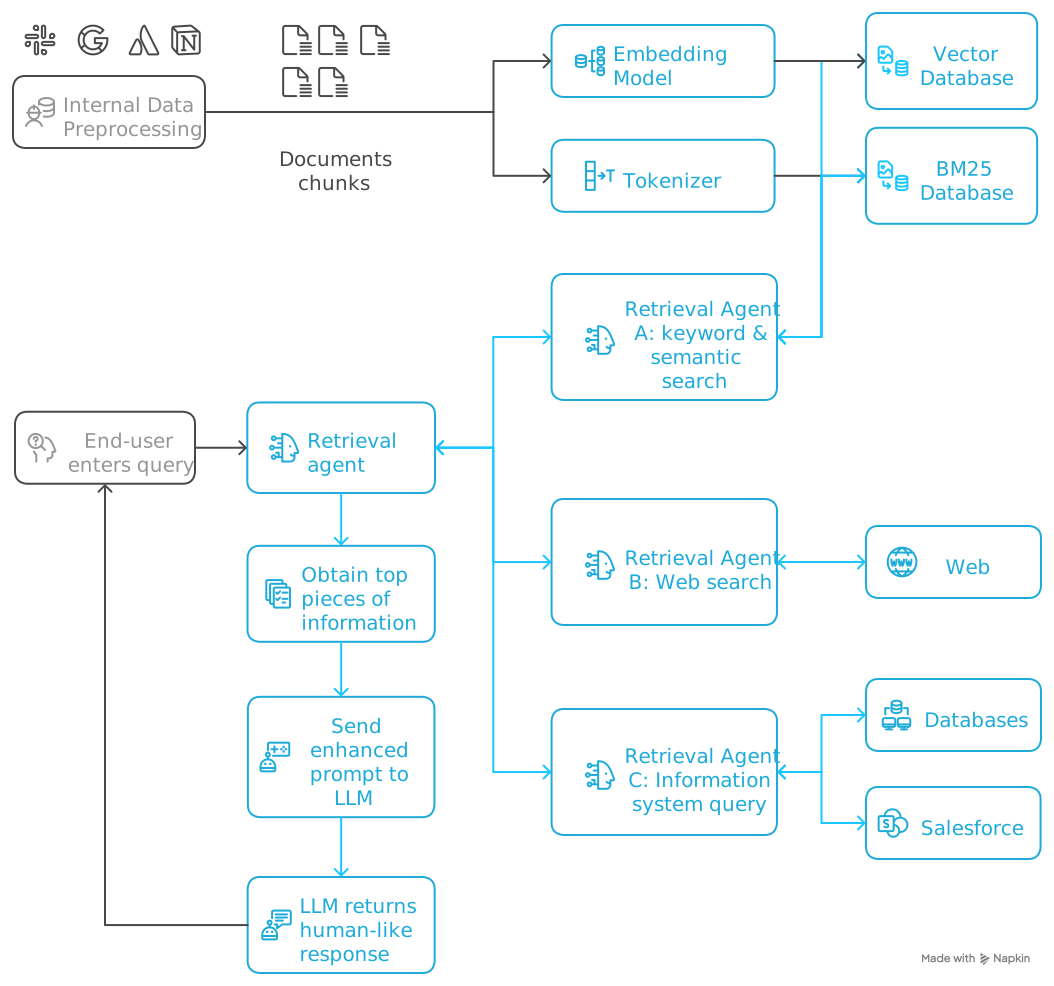 RAG - visual selection.svg
Key concepts explained
Chunking
Breaking large texts into smaller, meaningful parts. This allows the system to retrieve only the sections most relevant to your question, improving accuracy and efficiency.
Embeddings
Think of embeddings as unique "fingerprints" for pieces of text. They are mathematical representations that capture the meaning of a sentence or paragraph, enabling the system to compare and find similar content - even if different words are used.
Tokenizers
Think of tokenizers as the librarian’s reading glasses that help them break down text into understandable pieces. Just like how a librarian might read a sentence word by word, a tokenizer breaks down your text into smaller units called “tokens” - which can be whole words, parts of words, or even individual characters. For example, if you ask “What’s our remote work policy?”, the tokenizer might break this into tokens like: “What”, “’s”, “our”, “remote”, “work”, “policy”, “?”. Each token gets assigned a unique number (like a library catalog number), so the AI can process your question mathematically.
A helpful rule of thumb is that one token generally corresponds to ~4 characters of text for common English text. This translates to roughly ¾ of a word (so 100 tokens ~= 75 words).
Tokenization example: see OpenAI tokenizer.
Semantic Search vs. Keyword Search
- Keyword Search: Like searching for a book by its exact title.
- Semantic Search: Like asking a librarian for "books about starting a business," and they find relevant books even if they use different words (e.g., "entrepreneurship").
Vector Database
A vector database is like a super-organized library catalog. It stores all the embeddings and lets the system quickly find the most relevant information for your question.
Keyword Search Database
Search Database is like the librarian’s traditional card catalog system for finding books by specific keywords. When you search for “remote work policy,” it looks through all the documents to find ones that contain those exact words. However, This Guy is smarter than a simple word count. It considers:
- How often the term appears in each document (but doesn’t overvalue documents that repeat the same word 500 times)
- How rare or common the term is across all documents (rare terms like “sabbatical” are more valuable than common ones like “the”)
- Document length - shorter documents with your keywords get higher scores than very long documents where the keywords might be less relevant
Example: If you search for “expense report,” This Guy might rank a short 2-page expense policy higher than a 50-page general HR manual that only mentions expenses once, even though both contain your keywords.
Prompt engineering
This involves carefully designing how the retrieved information and your question are combined before being sent to the LLM. LLM Best Practices helps the LLM understand the context and generate better answers.
Updating external data
To keep answers current, This Guy regularly update their external data sources and re-calculate embeddings. This ensures the AI always has access to the latest information.
Source attribution (Citations)
This Guy can provide references or citations for the information it uses, making it easier for users to verify facts and trust the AI's answers.
Real-world example
Suppose you ask This Guy:
"What is our policy on remote work for new hires?"
The system will:
- Breaks your HR handbook into chapters or sections.
- Uses semantic search to find the relevant section about remote work.
- Feeds that section, along with your question, to the LLM.
- The LLM (your expert librarian) generates an answer, citing the exact page or section it used.
Summary
| Concept | What It Means | Example |
|---|---|---|
| RAG | LLM + real-time search for grounded answers | Librarian with access to all resources |
| Embeddings | Mathematical fingerprints of text meaning | Unique ID for every book in a library |
| Vector database | Stores and organizes embeddings for fast retrieval | Library catalog for quick searching |
| Semantic Search | Finds meaning, not just words | Librarian who "gets" what you mean |
| Keyword Search | Finds exact word matches | Searching by book title |
| Chunking | Breaks large texts into smaller, meaningful pieces | Dividing a book into chapters |
| Prompt engineering | Designing how info is presented to the LLM | Giving the librarian a clear question |
| Updating external data | Refreshing sources and embeddings regularly | Updating the library with new books |
| Source attribution | Providing references for answers | Footnotes in a research paper |
RAG technology makes This Guy more reliable and trustworthy by letting them "look up" the latest and most relevant information - just like a well-prepared librarian who always checks the stacks and cites their sources before giving you an answer.