
Connectors
ATG Connectors sync your organization's knowledge from Google Drive, Confluence, Slack, Notion, SharePoint, FTP/SFTP, and more. Available connectors, source refresh frequency, and custom integration options.
On this page
ATG Connectors automate the process of importing and keeping your organization's knowledge up to date. Instead of manually uploading files one by one, connectors integrate directly with your existing tools - like Google Drive, Confluence, or Slack - to sync documents automatically.
Each connector can be configured with specific parameters to control exactly what gets imported (e.g., specific folders, date ranges, or content types). Once set up, connectors can refresh automatically or on demand, ensuring your AI assistant always has access to the latest information.
Custom Connectors: Need to connect to a tool that's not listed below? That's where ATG's real value shines. We can build custom connectors tailored to your specific needs - whether it's a proprietary system, a niche platform, or a unique integration requirement. Reach out to discuss your use case.
Available Connectors
Learn about each connector and what it can do:
Cloud Storage
 SharePoint & OneDrive Connector

Documentation & Communication Tools



Files
Web sites

Custom Connectors: Need to integrate with a tool not listed here? We can build custom connectors tailored to your organization's specific needs - whether it's a proprietary system, an internal database, or any other platform your team relies on. Contact us to discuss your requirements.
Refresh frequency
The refresh frequency sets how often ATG updates the content imported from a source. It is configured per source, and only organization administrators can change it.
At each refresh, ATG detects the files added, modified, and deleted since the previous run, and only reprocesses what is needed.
- In the Admin Console, open Knowledge, then the Sources tab.
- Find the source to configure and select Edit.
- In the Refresh frequency field, choose Manual, Daily, Weekly, or Monthly.
- Select Save Changes.
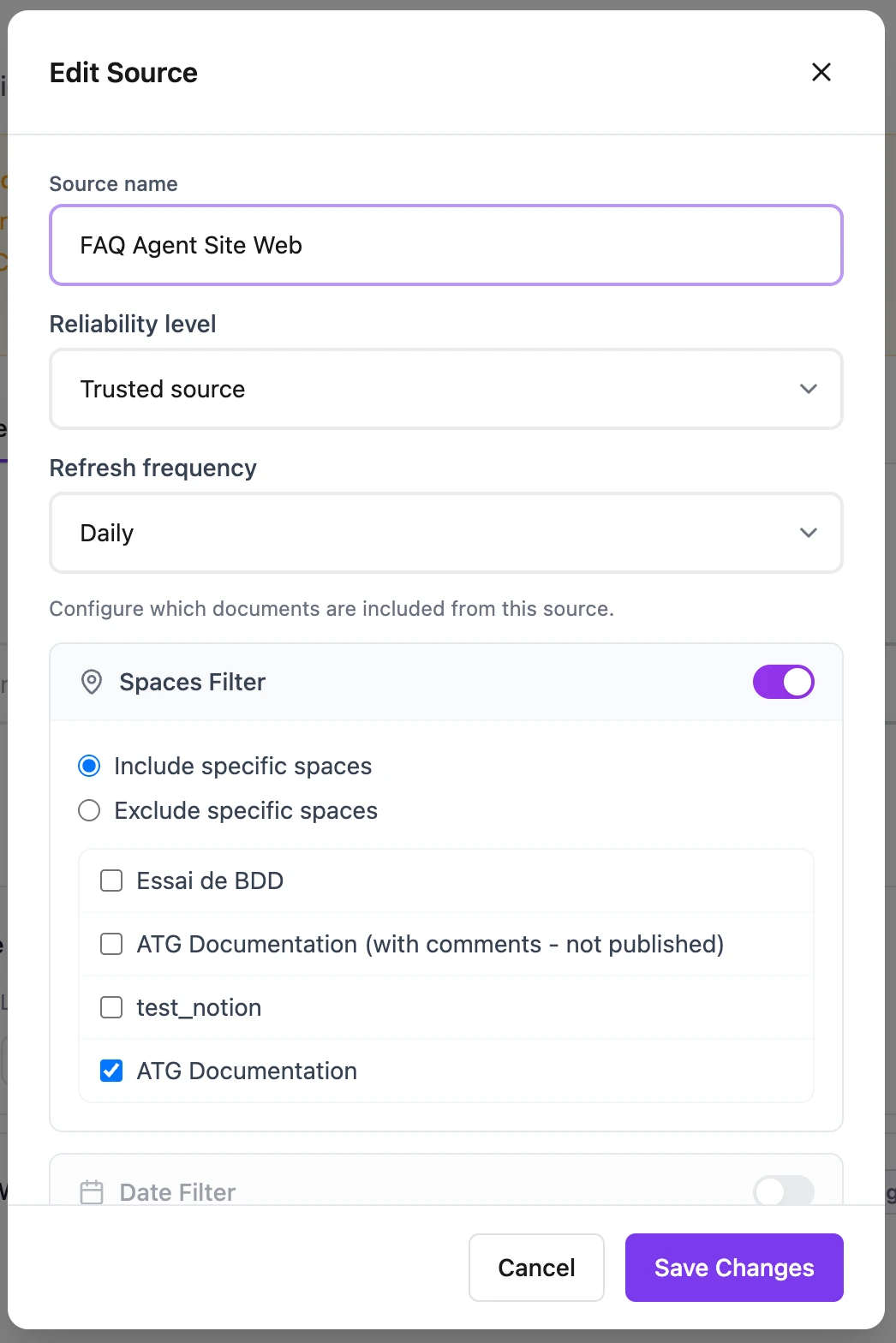
The selected frequency appears on the source's row, next to its last processing date. On Manual, no automatic refresh runs: use Refresh on the source whenever you need an update.
On creation, sources using the Google Drive, Confluence, Notion, Slack, SharePoint, and FTP/SFTP connectors are set to Daily, and web site sources to Weekly.
What to keep in mind
- Saving a new frequency does not restart importing. The new rhythm applies to the next runs of the scheduler.
- An automatic refresh can be postponed if the source was processed too recently, or if another job is already running on it.
- You cannot pick a specific time, a specific day, or a custom frequency.
- A source being updated is shown as refreshing in the list. If it fails, read the message attached to the source, then run a manual refresh once the situation is fixed.
Configuration Guides
Step-by-step instructions for setting up each connector in your organization: