
MCP servers
Connect MCP servers in the admin console: URLs, authentication, transports, and which tools are exposed to agents.
On this page
The MCP Servers screen is the place to connect AI agents to external tools and data stores through a standard protocol (Model Context Protocol), instead of building a separate integration for every product.
In the admin console, open Tools and MCP, then the MCP Servers tab. You can manage servers you added manually or through the MCP catalog. The list of configured MCP servers appears in this view.
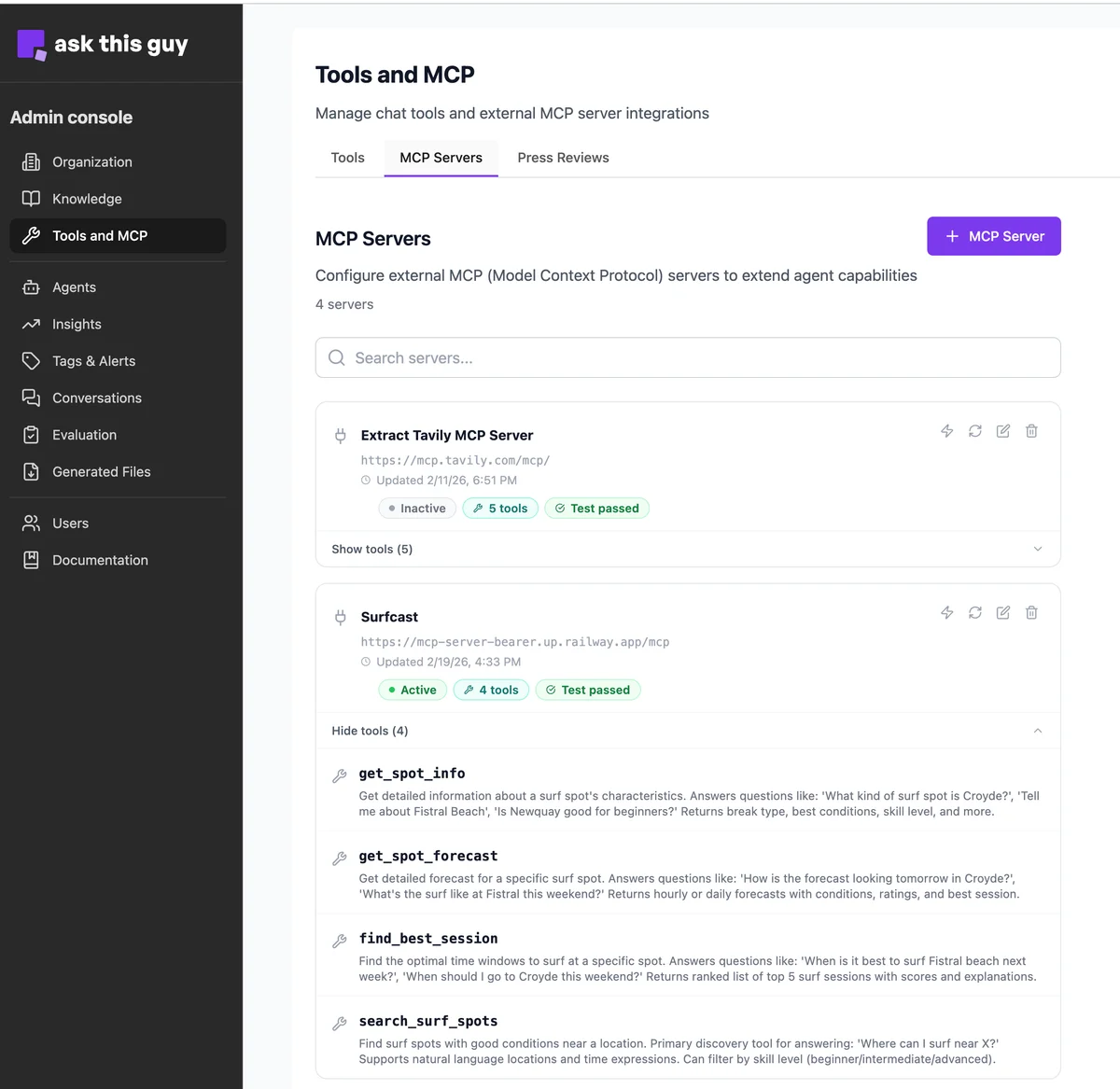 MCP Servers list under Tools and MCP
Role and behavior
MCP acts as a bridge between the AI and your systems. Rather than custom code per application, the protocol lets the AI discover what a remote MCP server can do and call it when needed.
-
Centralized management - Third-party systems (SaaS apps, internal databases, business APIs) are configured and supervised from one admin interface.
-
On-demand use - The model interprets the user's request and invokes the right MCP server only when it needs information or actions it cannot satisfy from built-in tools or internal knowledge alone.
Adding and configuring a server
Click + MCP Server to create a server. A dialog opens where you enter the settings below.
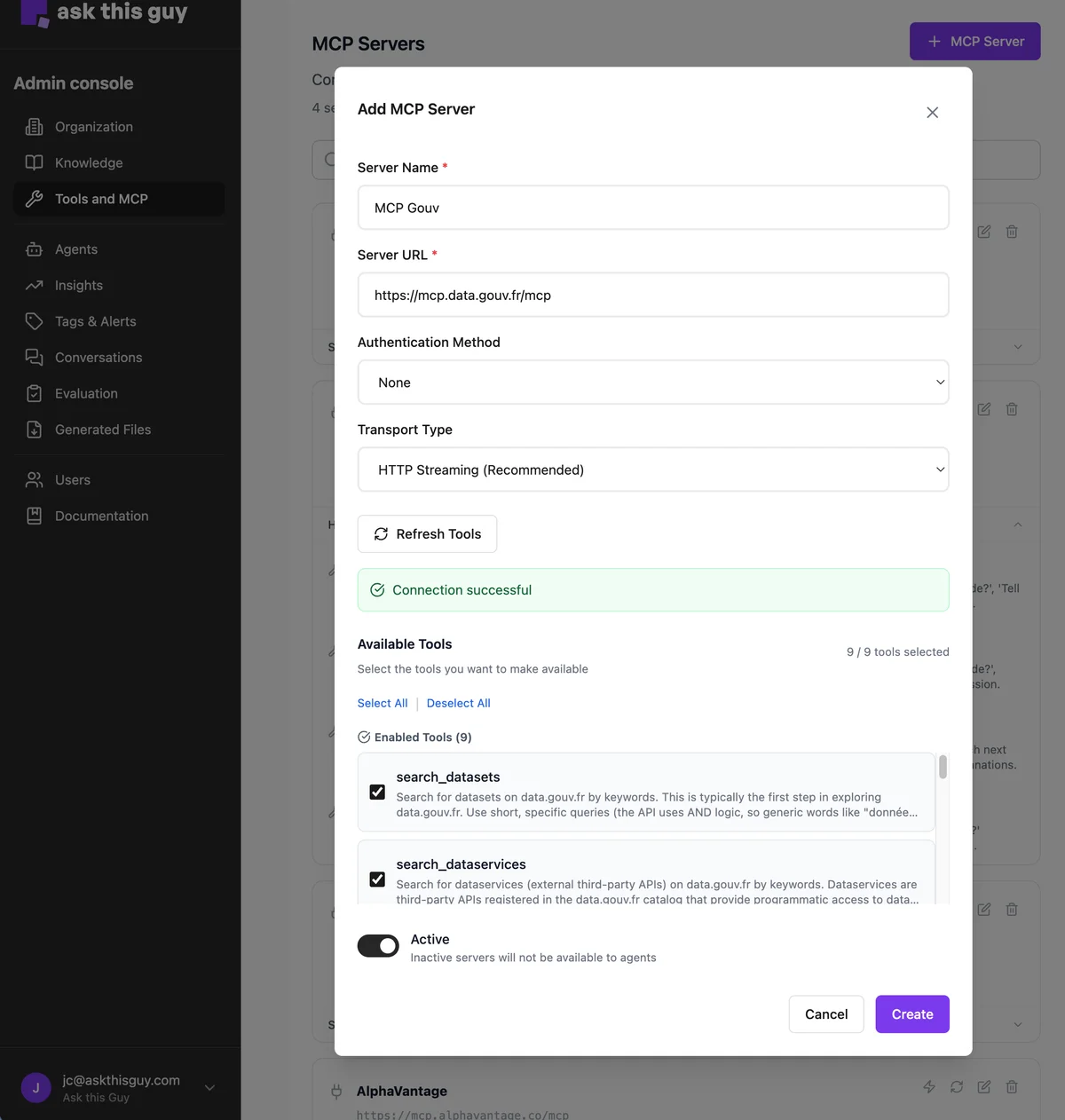 Add MCP Server configuration dialog
Connecting an MCP server is designed to be manageable without deep development expertise:
-
Server Name - Give the server a clear label so administrators can see which data source or integration it represents.
-
Server URL - Enter the MCP base URL. You can type it with or without a trailing slash, depending on what the MCP provider documents; what matters is that the combined URL matches the endpoint they expect.
-
Authentication Method - Choose how credentials are sent when connecting to the server.
-
None - Connect without credentials when the MCP endpoint allows unauthenticated access.
-
Bearer token - Provide a secret in the configuration; it is sent as a Bearer token in the request headers (not in the URL path).
-
API key in URL path - Provide a secret that is sent as the last segment of the path after the base URL (for example
…/your-base-url/<secret>). No Bearer header is used. Choose this when the MCP or upstream API requires a key in the path, which is common for some legal databases, registries, or other providers that document URL-based keys.
-
Credentials are stored securely. When you edit an existing server, leave the secret field empty to keep the current saved value; enter a new value only when you want to rotate or replace it.
-
Transport Type - Choose how the client talks to the server.
-
HTTP Streaming - Recommended default for most MCP deployments.
-
SSE (Server-Sent Events) - Use when the remote server is built for SSE instead of HTTP Streaming; match the option to the provider's documentation.
-
In practice: prefer HTTP Streaming unless the MCP host explicitly requires SSE.
Discovering and selecting tools
After the connection details are set, use Test connection so the product can reach the MCP server and list the tools it exposes.
Then configure which tools are available:
-
Choose a filter mode: offer all discovered tools, include only the tools you select, or exclude specific tools from the list.
-
Use the checkboxes next to each tool to define what is included or excluded, depending on the mode you chose.
You can mark the server inactive (or turn it off) when you want to stop exposing it in chat without deleting its configuration; set it active again when you are ready.
Adjust these choices at any time as your integrations evolve.
Combined analysis across sources
The value of MCP grows when it works alongside your other context:
-
Multiple sources - The AI can combine an MCP server (for specialized or live data), the internal knowledge base (for company context), and the web (for current events), according to what each query needs.
-
Synthesized answers - Results from MCP are merged into a coherent reply rather than a raw dump of tool output.
In short, MCP Servers turns the assistant into an orchestrator that can reach data where it lives, while you retain full control over which external tools are exposed.