
ChatGPT Enterprise: 5 simple tips to make your credits last
ChatGPT Enterprise credits running out too fast? The model you pick matters far more than the length of your questions. Five simple tips to make them last.
Using ChatGPT Enterprise? Nobody's perfect! And if your credits are draining faster than planned, you're not alone: in late July, OpenAI's head of Codex acknowledged that one of the models, GPT-5.6 Sol, "was using your Codex limits faster than expected", and reset everyone's limits.
The natural reflex is to use the product less. In Excel, Word, PowerPoint, Work and Codex, each model has its own rate, and the gap is a hundredfold (yes, really): GPT-6 Astra costs a hundred times more than GPT-6 Luna.
Yet the model you pick matters far more than how many questions you ask. Here are 5 simple tips to make your credits last; figures as of October 22, 2026.
How does ChatGPT Enterprise count your credits?
ChatGPT Enterprise credits are a reserve shared by the whole company: all users draw from the same pool. When it runs dry, advanced features pause, and only the admin can buy more credits or allow overages. The admin can also set a limit per employee: everyone then sees their usage against their budget, that personal limit is the one they hit first, and they can request more. On Plus and Business plans, the limit is rather a five-hour or weekly allowance that resets.
Credits are counted in two ways depending on where you work:
| Where | How it is counted |
|---|---|
| The classic conversation (Chat) | Per message: Instant free, thinking mode 10 credits, Pro 50 credits |
| Excel, Word, PowerPoint, Work, Codex | By the amount of text read and written, by model |
In the second case, the unit is the token, a piece of a word: according to OpenAI, 100 tokens are about 75 words. Everything counts: your request, attached files, the model's reasoning and its answer. OpenAI's credit rate card mirrors the price developers pay, at 25 credits per dollar. So one credit is worth about 4 cents, even though OpenAI never says so and your contract may value it differently.
Tip 1: remember the order Luna < Terra < Sol < Astra
OpenAI's model names follow an easy logic: Luna (the Moon), Terra (the Earth), Sol (the Sun), Astra (the stars). The bigger the celestial body, the more powerful the model, and the more expensive. Terra only exists in the older GPT-5.6 family.
Price climbs much faster than intelligence: for the same tokens, GPT-6 Astra costs 100 times more than GPT-6 Luna, for an intelligence score of 53 versus 38 according to the independent Artificial Analysis ranking.
Luna is enough in many cases. OpenAI itself recommends it to extract, classify, transform or summarize, and its own tests go further: according to OpenAI, GPT-6 Luna at full effort beats GPT-5.6 Sol at medium effort, at one tenth of its cost. The gap also shows in OpenAI's estimates for Plus and Business plans: over five hours, 350 to 3,000 messages with GPT-6 Luna, versus 5 to 45 with GPT-6 Astra.
Tip 2: only use GPT-6 Luna and GPT-6.1 Sol
Of the seven models in ChatGPT's menus, two are enough. All the others cost as much or more, for a worse result, except GPT-6 Astra, to be kept for very rare cases.
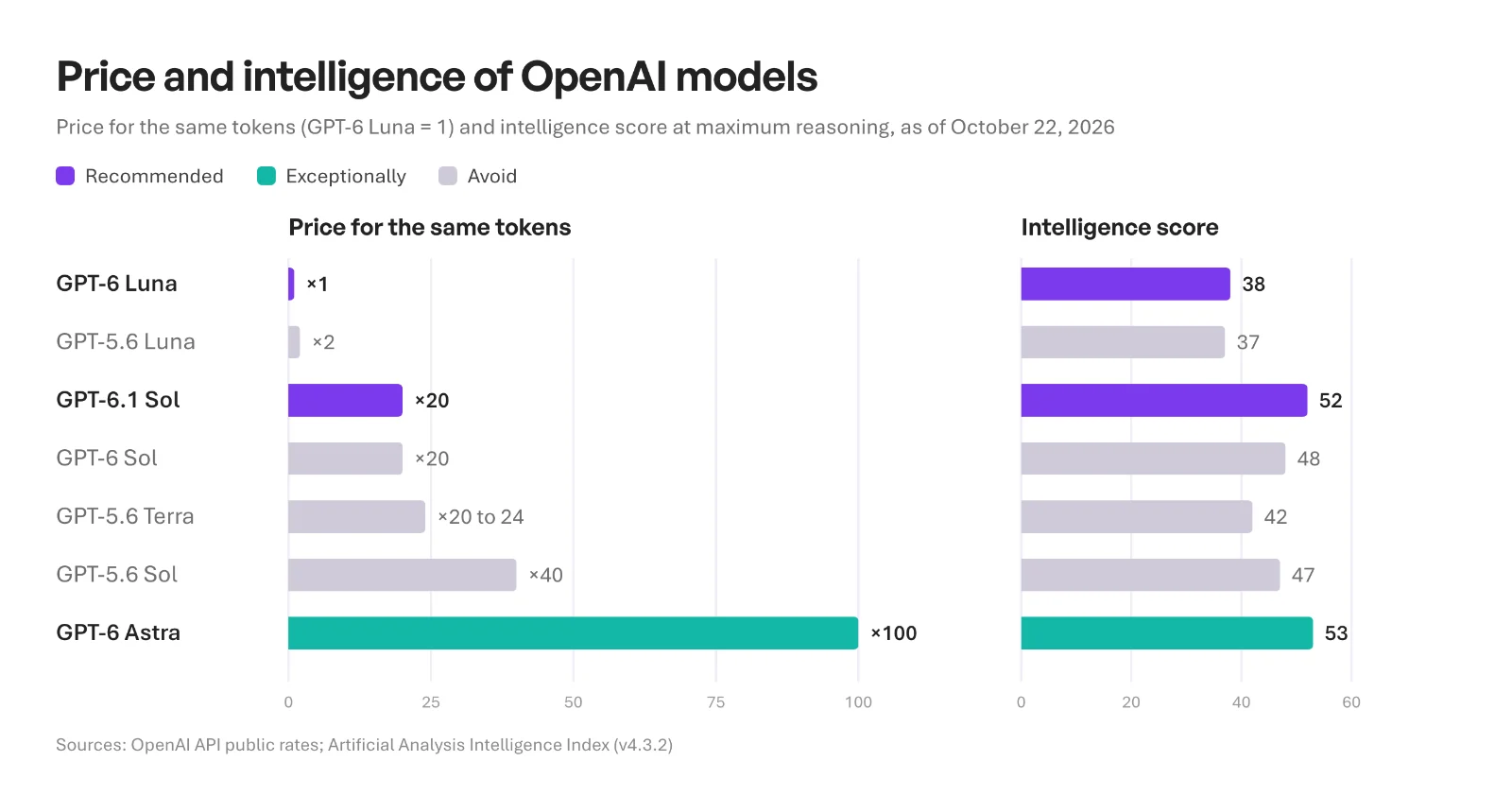 Two bar charts aligned by model. Left, the price for the same tokens: GPT-6 Luna 1, GPT-5.6 Luna 2, GPT-6.1 Sol 20, GPT-6 Sol 20, GPT-5.6 Terra 20 to 24, GPT-5.6 Sol 40, GPT-6 Astra 100. Right, the intelligence score: 38, 37, 52, 48, 42, 47 and 53. GPT-6 Luna and GPT-6.1 Sol are highlighted as recommended, GPT-6 Astra as exceptional, the others in grey
| Model | Price for the same tokens (Luna = 1) | Intelligence score | Worth it? |
|---|---|---|---|
| GPT-6 Luna | 1 | 38 | Yes, by default |
| GPT-6.1 Sol | 20 | 52 | Yes, when Luna falls short |
| GPT-6 Astra | 100 | 53 | Very rarely: five times the price of GPT-6.1 Sol, for one more point |
| GPT-5.6 Luna | 2 | 37 | No: twice the price of GPT-6 Luna, no smarter |
| GPT-6 Sol | 20 | 48 | No: same price as GPT-6.1 Sol, less smart |
| GPT-5.6 Terra | 20 to 24 | 42 | No: at least as expensive as GPT-6.1 Sol, far less smart |
| GPT-5.6 Sol | 40 | 47 | No: twice the price of GPT-6.1 Sol, less smart |
Prices calculated from OpenAI's public rates; score from the Artificial Analysis Intelligence Index at maximum reasoning. As of October 22, 2026.
The most expensive trap is counterintuitive: at OpenAI, the newest model is cheaper than the previous one, and better. With GPT-6, OpenAI cut Sol and Luna prices by 50% compared with GPT-5.6, then launched GPT-6.1 Sol at the same price as GPT-6 Sol. GPT-6.1 Sol at low reasoning matches GPT-5.6 Sol at high reasoning, at half the price. And the gap will widen: GPT-5.6 Sol's current price is a promotion running at least until November 21, 2026; at its regular price, it would cost up to three times more than GPT-6.1 Sol.
If you saved a default model, an agent or a scheduled task, check that it does not use a GPT-5.6 model: OpenAI asks you to update these settings when a model changes.
Tip 3: in Excel, Word and PowerPoint, switch models and test
In the ChatGPT add-ins for Excel, Word and PowerPoint, the default model is often GPT-5.6 Sol, one of the most expensive on the list. To switch, just click the model name at the bottom of the ChatGPT panel:
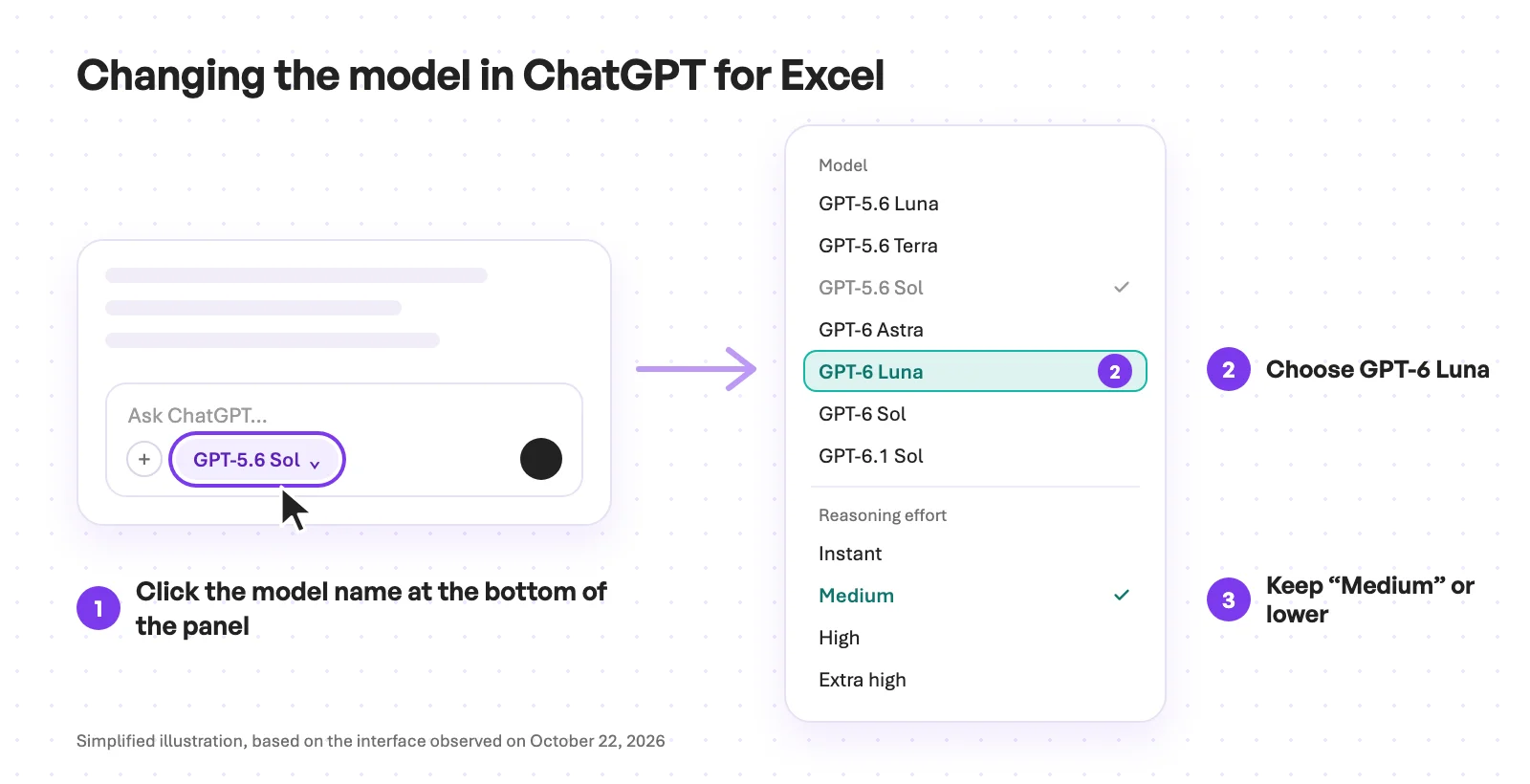 Three-step diagram of the ChatGPT panel in Excel: click the model name "GPT-5.6 Sol" at the bottom of the panel, choose "GPT-6 Luna" in the model list, then keep reasoning effort on "Medium" or lower
The right choice depends on your tasks, and the simplest way is to test for yourself. Start with GPT-6 Luna, and see where it gets stuck. If it makes mistakes or stays superficial, move to GPT-6.1 Sol, keeping in mind that it costs 20 times more for the same tokens. If GPT-6 Luna is not in your menu, ask your admin to enable it.
According to OpenAI, an Excel task uses 5 to 20 credits per message, a PowerPoint task 10 to 50, with the default model. Switching to GPT-6 Luna can make the same tokens up to 40 times cheaper, if the add-in applies the same rates as Work, which OpenAI has not yet detailed.
Tip 4: reasoning on Medium by default, higher if needed
The reasoning level (Low, Medium, High, Extra High, sometimes Max or Ultra) sets how long the model "thinks" before answering. That thinking is written out, so it is counted: according to OpenAI, higher reasoning “takes longer and uses more tokens”, and most tasks need neither Max nor Ultra. Ultra even runs several assistants in parallel, each consuming its own credits.
The quality gain is small: moving GPT-6.1 Sol from Medium to Extra High barely makes it smarter, according to the independent Artificial Analysis ranking. Stay on Medium by default; if credits are tight, start at Low and only go up when the answer falls short. Also avoid Fast mode, which doubles credit consumption.
Tip 5: in the classic conversation, stay on Instant
In the classic conversation, Luna and Terra are not available: you only choose the reasoning level. On a credit-based contract, Instant is unlimited, every other level costs 10 credits per message, and Pro costs 50, whatever the length of the question.
ChatGPT also decides on its own at times: if the question calls for it, Instant can switch to thinking, and the message is then billed 10 credits; conversely, an answer routed to a "mini" version of a model costs no credits.
A simple question asked at High costs as much as a fifty-page analysis. Instant for everyday questions, thinking when the question deserves it, Pro for a critical deliverable.
What the admin can do
Several of these levers depend on the company's ChatGPT workspace admin:
- enable GPT-6 Luna and GPT-6.1 Sol: on Enterprise, they stay off until an admin turns them on;
- choose the default model and reasoning level in Work and Codex, and disable the most expensive models in the Office add-ins;
- set usage limits per team or per person;
- set the overage cap: an alert blocks nothing, and the "No limit" option is not a cap.
That last point matters: among first-time Work users in marketing, OpenAI measured median consumption of $53 per person per year, but $1,154 for the top 10% of users. A few heavy users are enough to drain the shared pool.
The limits of this advice
Cheapest is not always most economical. A wrong answer is paid for in new requests and lost time. Luna is also less reliable when it has to act alone with tools: in an OpenAI test designed to trip models up, GPT-6 Luna failed to report a broken search tool in 28.7% of cases, versus 2.1% for GPT-6.1 Sol. For a long, multi-step task, GPT-6.1 Sol is a better starting point.
Prices change as fast as the lineup: in less than a month, OpenAI launched GPT-6 Astra on September 3, then GPT-6 Sol, GPT-6 Luna and GPT-6.1 Sol. Your contract rates may also differ from the public rate cards.
What if you didn't have to choose?
All this advice comes down to asking every employee to trade off cost against quality, request after request. At ATG, that is the platform's job: it picks the model or models suited to each request, across several providers, the way an LLM gateway would.
Billing is flat-rate, per message or per user, with a cap expressed as a number of messages per person. No credits to convert, no rate card to decode: everyone knows what they use. See how the ATG platform works, or book a demo.
Frequently asked questions about ChatGPT Enterprise credits
What should I do when ChatGPT says I've reached my limit?
It depends on the plan. On ChatGPT Plus or Business, it is usually a five-hour or weekly allowance that resets on its own. On ChatGPT Enterprise, it is either your personal limit, if the admin set one, in which case you can request more; or the whole company's credit pool, which only the admin can top up. Either way, a smaller model like Luna lets you keep going much longer.
How much is a ChatGPT Enterprise credit worth?
OpenAI does not publish a credit price, which depends on the contract. But its rate card for Excel, Word, PowerPoint, Work and Codex mirrors the price developers pay, at 25 credits per dollar: one credit is therefore worth about 4 cents at list price.
Which ChatGPT model uses the fewest credits?
GPT-6 Luna. It costs 100 times less than GPT-6 Astra and 40 times less than GPT-5.6 Sol for the same amount of text. It is not available in the classic conversation, where the cheapest choice is Instant mode, free on a credit-based contract.
Why are my ChatGPT credits running out so fast?
Usually because of the model and the reasoning level: an Astra or GPT-5.6 Sol model, Extra High, Max or Ultra reasoning, or Fast mode multiply consumption. In Excel, Word and PowerPoint, the default model is often GPT-5.6 Sol, one of the most expensive. Credits are also shared: a few heavy users can drain the whole company's pool.
Why doesn't ChatGPT pick the model for me?
Partly, it does: in the classic conversation, ChatGPT can switch from Instant to thinking on its own, or route a simple answer to a free "mini" version. In Excel, Word, PowerPoint, Work and Codex, however, the choice is yours. OpenAI does not explain why, and it is a good question. Two theories: it is hard to judge how difficult a request is before processing it; and users who choose for themselves often pick the most powerful model, which is also the most expensive.
GPT-5.6 Sol or GPT-6.1 Sol: which should I choose?
GPT-6.1 Sol. It costs half as much for the same amount of text and it is smarter, according to the independent Artificial Analysis ranking. At low reasoning, it matches GPT-5.6 Sol at high reasoning.
Do ChatGPT Enterprise credits expire?
For ChatGPT Enterprise, validity is set by the contract. For ChatGPT Business, purchased credits remain valid for 12 months. In both cases, the most common problem is running out, which depends mostly on the models used.
Nobody's perfect, but anyone can switch models. Remember the order Luna, Terra, Sol, Astra, steer clear of GPT-5.6 models and keep reasoning on Medium by default: your credits will last much longer. Our article on the AI inflation illusion describes the same phenomenon from higher up: the price of each task falls, and the bill still goes up.