
AI Inference: the 7 ways to run your models in the enterprise
Enterprise AI inference: 7 approaches compared, from buying GPUs to a turnkey provider. Real costs, sovereignty, latency and how to choose.
"We buy GPUs and host everything ourselves." "No, we plug in an API and move on."
That argument is a classic clash of philosophies over enterprise AI inference. It shows up early in an AI project, usually when the budget gets costed. On one side, the people who want AI in-house: buy the cards, install the models, nothing leaves the company. On the other, the people who want to consume a service: an API key or a subscription, pay as you go, no hardware to manage.
Both camps have good arguments. The trouble is that they are debating two options out of seven.
What they are arguing about has a name: inference.
What inference actually is
Inference is the moment an AI model answers a question. Not its training, which already happened and cost someone else millions: just the act of submitting a request and getting text back.
Inference recurs every day. It scales with your usage, for as long as your service runs. It is what determines the speed, the bill and the confidentiality level of your project.
A token is a small unit of text, a word or a fragment of a word. Providers bill per million tokens, counting input and output separately.
Input tokens are everything you send to the model: the user's question, but also the instructions, the conversation history, the document excerpts and the description of the available tools. Output tokens are what the model generates in response. At equal volume, output usually costs three to five times more, because every token produced requires a full pass through the model, whereas input is processed in one block.
The ratio between the two depends heavily on your use case, and it is what shapes your bill. A general-purpose assistant sends little and receives a lot: short question, developed answer. An agentic AI does the opposite. At each step, the agent sends back all the accumulated context, the results of its tool calls and the history of its attempts, to produce maybe three lines of decision. Input balloons on every turn of the loop. That is why providers offer reduced rates on the portion of context that is reused from one call to the next.
That leaves speed, measured in tokens per second. For simple chat or completion, 100 tokens/s gives an answer that feels fluid. For agentic work, where the model chains several calls before showing anything, aim closer to 500 tokens/s. We detail these thresholds in our article on local LLMs.
If you remember only one thing
The world is not binary. Between "buy everything" and "consume everything", the market offers a range of valid solutions, all with good reasons to exist, and most companies running in production mix several of them. The right choice depends on your context, not on a matter of principle.
Two reasonable ways to approach the subject. The first: don't overthink it, take a solution from a provider, and focus your vigilance on one thing, its billing metric. An offer billed per message, per user or per flat rate stays predictable. An offer billed per token, much less so.
The second: spend a few days on it, because the cost gap between the seven approaches is measured in orders of magnitude, not percentages.
Either way, what you are trying to avoid is called bill shock, and it happens regularly. In June 2025, Cursor moved its individual subscriptions to usage-based billing without its users understanding that the advertised "unlimited" only covered a single model; the company published its apology on July 4 and refunded three weeks of overages. On the Gemini CLI repository, developers convinced they were staying within a 1,000-requests-per-day limit discovered bills of 2,000, 6,400, sometimes 10,000 dollars: their API key billed per token, and the model's reasoning loops consumed hundreds of millions of them.
Same root cause in both cases. The user was thinking in requests, the provider was billing in tokens.
Four things are decided at the inference layer
Your users compare with ChatGPT
They arrive with a reference in mind, and that reference is called ChatGPT, Gemini or Mistral. They have grown used to text that streams instantly. If your internal assistant takes fifteen seconds to start its answer, nobody will say the infrastructure is undersized. They will say your tool doesn't work, and they will go back to the one they used before.
Plenty of B2B solutions run at that pace today. The product does what it promises, the demo goes well, and nobody opens it a second time.
That latency plays out almost entirely at the inference level, and it is by far the leading reason for abandonment we see on internal assistants. A technically sound project dies just fine from fifteen seconds too many.
Nobody holds 99.9% on their own
The large AI providers run around 99 to 99.5% availability, meaning several cumulative days of downtime per year. Your users, meanwhile, are used to four nines on their office tools. The gap shows.
We published the real figures by provider in Enterprise AI SLA. The most common design flaw we come across has not changed in two years: a single provider, no fallback.
You are sending your documents to someone
Running inference means passing a third party your user's question and the document excerpts used to answer it. Contracts, internal notes, customer data. Better to know to whom, under which law, with what retention policy and what no-training commitment.
There is no universal right answer here, only a slider to position. We documented ours on the sovereign AI page.
The model at the top of the leaderboard costs a lot for nothing
It is almost never the one you need. To classify a ticket, extract a field or rephrase an answer from supplied documents, a smaller, faster model does the job.
Above all, the price gap has nothing to do with the capability gap. Here are four market offers, placed by their average cost per million tokens and their intelligence index:
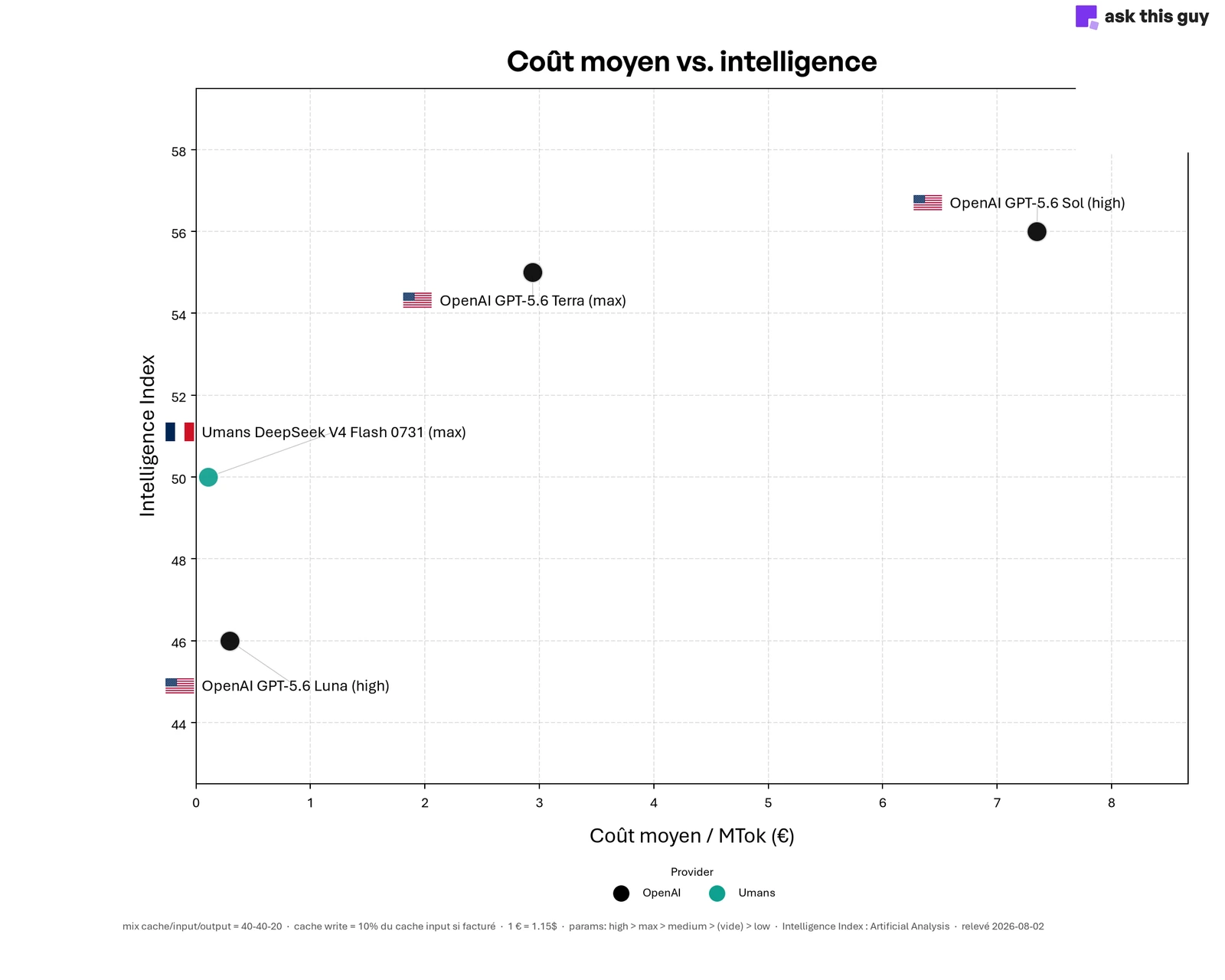 Scatter plot comparing cost per million tokens and intelligence index for four offers. DeepSeek V4 Flash served by the French provider Umans reaches an index of 50 for €0.11 per MTok, while OpenAI's GPT-5.6 Sol reaches 56 for €7.35, and GPT-5.6 Luna 46 for €0.29.
GPT-5.6 Sol costs €7.35 per MTok for an "intelligence" index of 56. DeepSeek V4 Flash served by Umans costs €0.11 for an index of 50. Six points of difference, a factor of 69 on the bill.
Now look at GPT-5.6 Luna, at the bottom of the cloud: nearly three times the price of the Umans offer, for an index four points lower. Paying more does not even guarantee getting better. The leaderboard tells you what a model can do, never what it will cost you.
One last point, and it is the one we repeat most often: a benchmark ranks models on generic tasks, never on yours. An intelligence index says nothing about how a model behaves on your domain jargon, your documents, your language or the output format you expect. Take two days to run three or four candidates on a representative sample of your real cases, and compare what comes out. That is the only ranking that matters for you, and it regularly upends the official order.
Intelligence index: Artificial Analysis, August 2026 readings. Average cost computed on a mix of 40% cached input, 40% fresh input and 20% output, at €1 = $1.15. The max and high labels refer to the model's reasoning effort level.
The seven approaches
1. Buy your GPUs and run them yourself
You buy the cards, you install them, you deploy the models, you maintain the whole thing. Maximum control: your data never leaves, you choose everything, and nobody changes your terms overnight.
Maximum CAPEX too. For a genuinely fast and capable model, expect six figures, plus the skills to hire to operate the machine. Your AI infrastructure becomes a project in its own right, with its own budget and team. We ran the numbers in detail in On-premises RAG: what can you do with €60k?.
Reserve this for absolute regulatory constraints, massive and stable volumes, and companies that already have an infrastructure team. Or for those planning to resell their capacity when it is idle, which we come back to in approach 4.
2. Rent dedicated GPUs from a cloud provider
Same architecture, same deployment work, but the hardware is no longer yours. The CAPEX becomes predictable OPEX, electricity and cooling included, and hardware failures are your provider's problem.
Be wary of the hourly headline price. A service available around the clock runs 730 hours a month, so that hourly price is really a monthly rent. An H100 at Scaleway is €2.73 an hour, which goes down well in a meeting, and costs nearly €2,000 a month, €24,000 a year, for a single card. At Verda, a Finnish operator whose data centers are in Finland and Iceland, the H100 SXM5 is $3.25 an hour, with an 8% discount over one year and 25% over two.
The next reflex is to compare with buying. An H100 PCIe trades between $25,000 and $33,000 on the market, an H100 SXM5 between $35,000 and $40,000. Renting a card around the clock therefore costs its purchase price in twelve to seventeen months depending on the model and provider. And one card is rarely enough: a server with eight H100s, sized to serve a large model properly, runs around $19,000 a month, or $228,000 a year, while the equivalent machine costs upwards of $350,000 to buy. Eighteen months to break even.
On paper, that is excellent. Except the comparison pits a card against a service. The purchase price includes neither the data center, nor the electricity, nor the cooling, nor the network, nor the teams that operate the whole thing. And the asset depreciates fast: a used H100 resells for 60 to 70% of new while the B200s and B300s arrive and pull rental prices down. You are amortizing over three years a piece of hardware whose equivalent rent will have dropped before the period is out.
At that scale, renting does not make the six figures of approach 1 disappear: it turns them into an annual rent.
3. Spin up GPUs only when you need them
You turn the machine on, or rather a container in most cases, you do the work, you turn it off. Some providers bill by used time slice, ten minutes at Verda for example, which means a job that finishes in 45 minutes costs 50. Many also offer spot rates, on available capacity, at half price.
Two hours of processing per night make around sixty hours a month, roughly $98 on spot, where the same card held continuously costs $2,370. Factor of twenty-four. It is the best deal on the market for background processing: document reindexing, embedding computation, bulk classification, extraction over a stock of PDFs.
For a service open during the day, forget it. Starting a machine and loading a model takes minutes, and a spot instance can be reclaimed from you mid-run. Nobody waits five minutes for their assistant to wake up.
4. Rent surplus capacity from those who have too much
The people who chose approach 1 have GPUs sitting idle part of the time. A market has grown to resell those off-peak hours, often well below the prices of the large providers, since the hardware is already paid off anyway.
This category covers two very different realities. At one end, players who have turned it into an enterprise service: capacity reserved by contract, an availability commitment, an identified operator, hardware hosted in known data centers. You access it as you would with any cloud provider, with a bill and a point of contact, but at a rate pulled down by the fact that the cards already existed.
At the other end, the peer-to-peer market. Darkbloom, out of Eigen Labs, runs inference on idle Apple Silicon Macs, with encryption designed so that the machine's owner cannot read what passes through it. The project is still experimental and we would not put a critical service on it today. The idea holds up: tens of millions of recent Macs sit dormant much of the day with plenty of memory available.
In both cases, look at who operates the machine, what they can see, and what availability commitment they sign. That is what separates a good deal from a gamble.
5. Go through an inference provider
No more machines to manage. You call an API, you pay per token, and someone else keeps GPUs warm around the clock for you.
Two families coexist. The inference pure players serve open weights models and compete on speed and price: Cerebras, Groq, DeepInfra, Nebius. The consumer players, OpenAI, Anthropic, Google, Mistral, serve their own models.
The difference shows on the bill. At comparable quality on many tasks, the former are noticeably cheaper, because the latter also bill for their reputation and the exclusivity of their models. Since the same open model runs at a dozen providers, you can change your mind without touching your prompts.
Choose a player that publishes a real service commitment, not just a status page. And plan a fallback from day one.
6. Put a gateway in front of several providers
You plug several of them in behind a single layer, which measures their health, arbitrates on speed and price, and switches automatically when one falls behind. This is what is called a multi-provider gateway, or AI gateway.
No provider reaches 99.9% on its own. Stacked behind a gateway that tests and switches, you get there. The availability figures are in Enterprise AI SLA, and the comparison of gateways on the market, from OpenRouter to LiteLLM, in LLM gateway: OpenRouter, LiteLLM or build your own?
7. Let your platform handle it
You buy an enterprise AI product and inference becomes someone else's problem. No GPUs to run, no gateway to build, and keeping up with the models no longer concerns you.
In exchange, you inherit your provider's choices. Hence the question to ask before signing: can they describe their inference chain? Which providers, in which jurisdiction, with what fallback, under what no-training commitment. Anyone who stays vague about that part is asking you to trust them on the most sensitive link.
The seven AI inference approaches compared
Reading: green is favorable, red unfavorable. The ± sign marks a criterion that depends on the provider you pick.
| # | Approach | Cost model | Operational lightness | Reliability | Sovereignty | Time to start | When it's the right choice |
|---|---|---|---|---|---|---|---|
| 1 | Buy the GPUs | High CAPEX | −−− | ++ | +++ | Months | Absolute regulatory constraint, massive volume |
| 2 | Rent dedicated GPU | High, predictable OPEX | −− | ++ | ++ | Days | Stable volume, location requirement |
| 3 | On-demand GPU | Usage-based OPEX | − | −− | ++ | Hours | Background processing, batch, occasional peaks |
| 4 | Surplus capacity | Very low OPEX | − | − | ± | Hours | Tight budget, verified operator |
| 5 | Inference provider | Per token | ++ | − | ± | Minutes | The majority of projects |
| 6 | Multi-provider gateway | Per token, plus the layer | ++ | +++ | ± | Days | As soon as a real service level is expected |
| 7 | Turnkey platform | Subscription | +++ | +++ | ± | Minutes | You are buying a business outcome |
In practice, a company often combines several solutions
A single approach can be perfectly enough, and often is when the scope is clear and usage is homogeneous. But as soon as use cases diversify, companies regularly end up with two or three different regimes. Either way, start from your hardest constraint and let the rest organize itself around it.
A regulatory constraint almost never applies to your entire scope. Isolate the genuinely sensitive use case on dedicated infrastructure, leave the rest on shared. It is often that split that unlocks a budget, because it brings the strong requirement back down to the part of the project it really concerns.
When latency is what dictates, it dictates only the interactive part. A company we work with runs its nightly document reindexing on on-demand GPU, for a few dozen euros a month, and serves its assistant during the day through a fast inference provider. Two cost regimes, one project.
And if it is the budget, start with approach 5 or 7, without hesitation. Six months of real usage will tell you whether bringing it in-house makes any sense. It is almost always more expensive than expected, and nobody realizes it until they have the figures in front of them.
To set the orders of magnitude, here is the same H100 seen from three angles:
| Access to an H100 | Cost | Basis |
|---|---|---|
| Purchase | ~$30,000, i.e. ~€26,000, the card alone | Market price PCIe and SXM5 |
| Dedicated rental, 24/7 | ~€2,000 a month | Scaleway, €2.73/h × 730 h |
| On demand, 2 h per night | ~$98 a month | Verda spot, $1.63/h × 60 h |
The hardware is identical in all three cases, only the usage regime changes.
How long do you have to rent before you have spent the price of the card? Continuously, at €2,000 a month, it takes you thirteen months to reach the €26,000 purchase price. On the on-demand regime, at €85 a month, it takes you more than twenty-five years.
That is where the decision is made, and nowhere else. Buying only becomes worthwhile if you know the machine will genuinely run around the clock, for several years, on volumes you have already measured.
At Ask This Guy
Today, our clients are in case 7. They operate no GPUs, build no gateway, and inference does not appear in their budget.
That only holds because we ourselves mix approaches 2, 3 and 5. We build our own GPU infrastructure at Verda, in Finland and Iceland, where we deploy and operate certain models, and in parallel we consume selected inference providers behind our AI provider gateway. You then position the slider, EU-only policy or worldwide, changeable at any time from the console. Everything is public in our approach to sovereign AI.
If we are writing this article, it is because the trade-offs described here, we have paid for them.
Bring Your Own AI: plug in your own inference
Case 7 should not be a dead end. If you already have GPUs, a contract with an inference provider or your own gateway, you should be able to plug them in rather than scrap them.
That is what our Bring Your Own AI mode enables: connecting your own models, providers or inference endpoints to the platform. It is available today on request, and will soon be offered as standard.
Concretely, the other six approaches stay open. GPUs bought last year plug in. A rate negotiated with an inference provider carries over. And if you prefer to start turnkey and bring it in-house in eighteen months, once your volumes are genuinely known, you will not have to switch tools along the way.
Frequently asked questions about AI inference
What is inference in AI?
Inference is the phase where an already-trained AI model processes a request and produces a response. It contrasts with training, which is the model's learning phase. For a company, training is a rare and often nonexistent cost, whereas inference is a recurring cost proportional to the service's real usage.
How much does LLM inference cost in the enterprise?
The cost of LLM inference depends entirely on the approach chosen. With dedicated GPU rental, an H100 held continuously comes to about €2,000 to €2,400 a month, or nearly €24,000 a year for a single card, and a server with eight cards exceeds €200,000 a year. Going through an inference provider billed per token, an internal assistant for a few hundred users most often runs into the hundreds of euros a month. The gap between the two models justifies measuring your real volumes before bringing it in-house.
Do you need to buy GPUs to do AI in the enterprise?
In the vast majority of cases, no. Buying GPUs is justified when a regulatory constraint forbids any data from leaving, when the volume is massive and stable, and when an infrastructure team already exists to operate the hardware. Outside those conditions, renting or using an inference provider costs less and is set up in minutes rather than months.
What is AI infrastructure?
AI infrastructure covers everything needed to run artificial intelligence models: the GPUs, the servers that host them, the network, the storage, and the software layer that serves the models. In the enterprise, the question is not only which components to choose, but who operates them: you, a cloud provider, an inference provider, or your platform's vendor.
What is the difference between an inference provider and an API gateway?
An inference provider runs the models itself on its own GPUs and bills you for the tokens consumed. An API gateway, or multi-provider gateway, runs no model: it sits in front of several providers, measures their availability and speed, and switches automatically from one to another. The two are generally used together, the gateway serving to reach a service level no single provider achieves on its own.
Conclusion
Your AI project will force you to settle the question of inference, and probably as soon as the budget is costed. You can build your own AI infrastructure, delegate everything, or assemble something in between.
The projects that hold up in production are not the ones that picked the right camp. They are the ones that knew there were seven.
If you are preparing an AI project and want to test your use case against these trade-offs: book a demo.