
SaaS chatbot: product support, data, and AI actions
A chatbot built into a SaaS product cuts tickets, limits churn, and surfaces upsell opportunities. Product support, data, and actions: a guide by maturity level.
A customer who pays their subscription isn't necessarily an engaged customer: an account can stay billed for months while the user behind it has already checked out, opens the product less and less, never reaches the features that justify the price, and quietly prepares to leave.
A SaaS company's permanent job isn't selling the subscription, it's continuously maximizing the value each customer actually gets out of the product. Without usage, without satisfaction, without customers growing more capable with the product, cancellation is only a matter of time.
That risk has gotten sharper with a recent shift: pretty much anyone can now vibe code an internal tool with AI, no development skills required. The barrier that used to protect an average product, the cost of rebuilding it yourself, is collapsing for a growing share of use cases. A dissatisfied customer no longer just has the option of shopping a competitor: increasingly, they can simply recreate the part of your product they actually use.
A chatbot properly built into a SaaS product attacks this problem head-on. Not as a gadget parked on the homepage, but as a piece of the product that increases the value actually extracted from every interaction, and that finally makes visible what used to play out, unseen, between two billing statements.
This article walks through three levels of integration, from the fastest to the most ambitious, and the piece that ties them together: visibility into what's actually happening in the conversations, the one place where real engagement becomes visible before it's too late.
Three levels, one chatbot
"Building a product chatbot" is often treated as a single, binary project: you build it, or you don't. In practice, the value stacks up in layers, and each layer has a different cost and a different level of complexity.
- Level 1 (answer generic requests): the chatbot draws on product documentation and the user's context.
- Level 2 (answer with customer-specific data): it queries the account's business data to provide a personalized response.
- Level 3 (act on the customer's behalf): it triggers authorized actions in the product through APIs and workflows.
Level 1: answering generic requests
Nobody reads product documentation anymore. Your users are looking for a menu, trying to understand a feature, or checking their configuration, and they don't have time to dig through twenty pages to find the answer. When they can't find it, they open a ticket, even when the answer already exists.
 Help widget inside the Ask This Guy admin console, guiding an administrator step by step through configuring the SharePoint connector
The difference with a simple search bar bolted onto the product is context. A good support assistant knows which plan the user is on, which version of the product they're using, what role they have, sometimes their recent history, and even which page they're on and what they're in the middle of doing. The answer to "how do I export my data" isn't the same for a free-plan user and an enterprise-plan admin, and the assistant should know that without being told every time.
This is also, by far, the fastest level to set up. It doesn't require a technical overhaul: access to your documentation, and sometimes a bit of read-only account data, is enough to get started. This is literally what our own admin console does, itself a SaaS product: an admin asks "how do I configure SharePoint?" from the Knowledge page, and the widget answers with a sourced walkthrough instead of pointing them to a separate doc article to go dig up themselves. On deployments like this, 40 to 60% of tickets are about content that's already documented. That's the volume this first level absorbs.
One detail worth not overlooking: this level serves both of your audiences. The customer gets a sourced, contextualized answer. Your support team sees what's actually left: bugs, complex cases, the product signals that deserve a human.
Every bit of friction removed is a little more value genuinely extracted from the product, and a little less reason to go looking for an alternative, whether homemade or from a competitor.
See the solution page: product support assistant.
Level 2: letting users query their own data
Data presentation in a SaaS product is almost always a compromise. You design dashboards and information-access menus around the most common use case, and they never quite match what's needed in the moment. A user who wants to cross two filters you didn't anticipate goes back to your team, exports a file, or gives up.
A chatbot connected to your data flips the question. Instead of adapting their need to the existing dashboard, the user asks their question directly, in plain language, and gets a numeric answer, a chart, sometimes an export.
Take a concrete example: a fleet management SaaS.
"How have my breakdowns in the Lyon area trended over the last 12 months?"
The assistant returns the trend, with a visible spike in July. The user follows up, without switching tools or restating their question from scratch:
"Is this seasonal? Is it always the same models? Maybe the 308?"
That's the kind of follow-up no static dashboard allows, because you'd have had to anticipate the question in advance. On deployments like this, we typically see twice as many users actually making use of the data, precisely because the channel no longer requires technical skill or a back-and-forth with a data team.
This level is also relatively simple to implement once the chatbot has access to your databases or APIs: it doesn't invent anything, it reads and surfaces what already exists in your system.
It doesn't replace your dashboard, it complements it: the dashboard tracks how your metrics evolve over time, the conversation explains why a number moved and explores the factors behind it, without having to build a new report for every question.
This is also the level where the gap with a homegrown tool widens. A pivot table on an export, anyone can vibe code that in an hour. A conversation that understands an account's business context and answers with real production data is a lot harder to improvise.
See the solution page: Talk to Data.
Level 3: triggering actions
A chatbot answers. An agent acts. That's the shift that really sets this third level apart from the first two, and it's also what changes the complexity calculation.
Two families of actions make sense in a SaaS product. The first covers everyday actions, simple but repetitive: changing an account setting, adding a user, updating a configuration, things the user would do in three clicks anyway, but can now ask for in one sentence. The second is where AI genuinely adds value: pulling in a relevant piece of public data to enrich a record, generating content from the account's context, analyzing a customer's recent usage to recommend a configuration or plan change before they even ask.
It's this second family that really differentiates a product, because it goes beyond simply answering a question that was asked.
This level changes the nature of the project. Read access to documentation or data is no longer enough: you need an authorization system that precisely defines what the agent can do for which user profile, adapted APIs for every possible action, and often specific workflows for actions with real consequences (billing, personal data, contractual commitments). It's a real investment, but concentrated on a small number of high-leverage actions rather than spread across the whole product, and it's also the hardest level to recreate without a technical team, which makes it, once in place, the most durable of the three advantages.
Finally understand your customers and their unspoken needs
Most product chatbot projects stop at the answer: the bot answers well, everyone moves on to the next project. That misses the point: the revenue dashboard says nothing about a customer's real engagement, but their conversations with the chatbot do. Every exchange is a signal, and most of those signals never surface anywhere else.
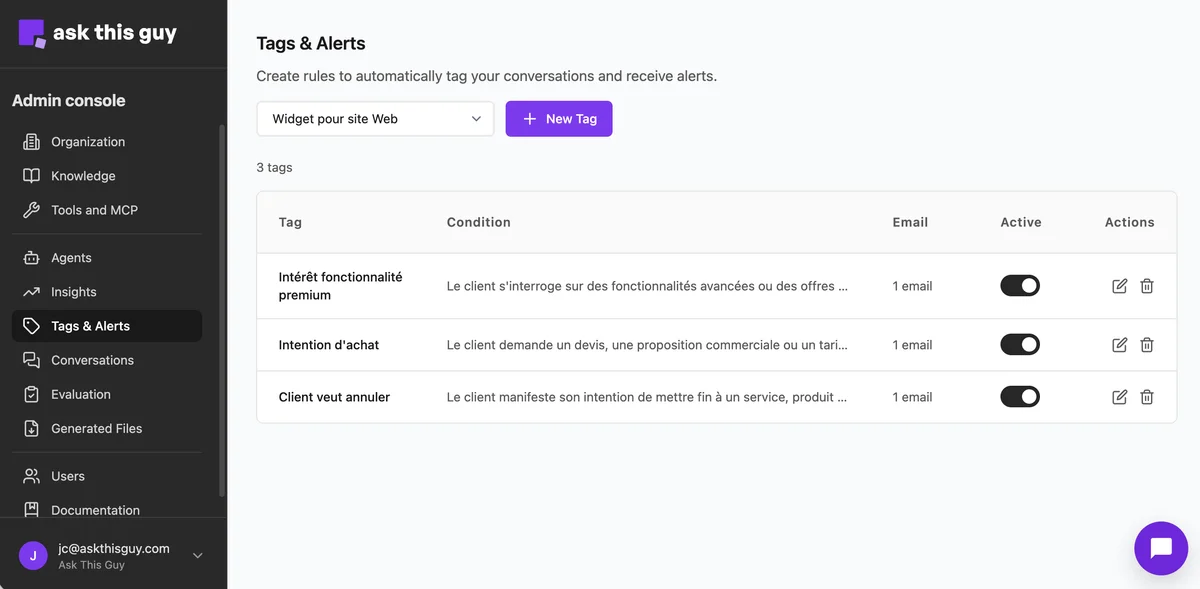 Tags & Alerts screen with three example rules: interest in a premium feature, purchase intent, and a customer wanting to cancel
Concretely, two building blocks turn these conversations into something you can act on.
Tag and alert rules, described in plain language. Instead of a fixed list of keywords, you describe a condition the way you'd explain it to a colleague: "the customer is asking about advanced features or plans above their current tier," "the customer is signaling they want to end a service." When a conversation matches, it gets tagged automatically and, if you turn it on, an email alert goes to the right team. That's the mechanism that turns a hunch ("we should be catching cancellation signals") into a process that runs on its own.
A dashboard that tracks all this over time. Conversation volume, automatically detected sentiment, thumbs-up or thumbs-down reactions, breakdowns by tag and by agent, comparison against the previous period. Enough to answer simple questions that rarely get measured: is sentiment slipping on a given feature since the last release? Which agent is concentrating the most frustration? Where should attention go this week?
This is where anti-churn and upsell stop being intentions and become active rules. A customer signaling they want to end a service, or asking about advanced features, triggers an alert before the issue surfaces through another channel, or doesn't surface at all.
Documentation: tags and alerts and Insights.
Should you build it or buy it?
In the vast majority of cases, the answer is buy, and that holds across all three levels, from support to triggering actions.
Building a minimal chatbot from a model and a vector database is doable in a few days for a demo. But the expensive part is never the demo, it's everything around it: managing user context by plan and profile, search that actually finds the right information in your sources, reliable citation of those sources, ongoing evaluation of answer quality, inference cost monitoring, orchestration and permissions once you touch actions, and the whole visibility and alerting layer described above. That part accounts for roughly 90% of the work. It's generic, in the sense that it doesn't depend on your business, but it's far from simple: it's what separates a chatbot that impresses in a demo from one your customers are still using six months later. A full in-house build is measured in person-months, and then it needs maintaining for as long as it runs: we cover these pitfalls in our article on common enterprise RAG mistakes.
That's the 90/10 logic we apply at Ask This Guy: that 90% (chat, our six-way hybrid search, permission management, oversight and alerting, hosting) is a platform that's already built and keeps evolving without you having to do it. That's the foundation of our turnkey enterprise RAG. The remaining 10% (your documents, your user context, your APIs, your action workflows) is what actually makes the difference for your customers, and it's the only place where custom work is worth it.
Two situations break this rule. The first is when AI isn't a feature bolted onto your product but its actual core: at that point, owning the stack becomes your differentiation, and building it in-house is justified. The second is when your business volume is very large, a big B2C product, say: the cost of an in-house build then amortizes over a user base large enough to change the math.
| Criteria | Full in-house build | Existing platform |
|---|---|---|
| First useful scope | Several months if the team starts from scratch | A few days to a few weeks |
| User context (plan, role, history) | To design and maintain | Standard building block, wired to your data model |
| Oversight and alerting | Has to be built from scratch | Already available, rule-based configuration |
| Actions and permissions | Authorization system to design | Existing framework, specific workflows to define |
| Maintenance | On your product team | Carried by the vendor |
| Makes sense when… | AI is the core of the product, or business volume is very large | In every other case |
On the projects we run, TCO drops by roughly 80% compared to a build carried out entirely in-house, with a first useful scope in weeks rather than months.
Ask This Guy's approach
We deploy product assistants on a platform that already provides the chat, user context, oversight, and alerting. The specific work goes into your documentation, your APIs, and the actions that genuinely make sense for your product.
Our approach always starts at level 1: a narrow scope, connected documentation, a first use case you can measure within a few weeks. The next levels, data and actions, get added once the first one has proven itself with your users, without starting over on the technical stack.
Running a SaaS product and want to work out what a chatbot would change for your customers? Book a call with us.
Frequently asked questions about chatbots in SaaS products
Isn't recurring revenue enough to measure account health?
No. A customer can stay billed for months after they've stopped getting real value from the product: they open the app less often, stop exploring new features, and quietly prepare to leave. MRR is a lagging indicator, it confirms a problem after the fact rather than announcing it. Real engagement signals, such as usage frequency, sentiment expressed in exchanges with an assistant, or repeated questions about the same friction point, are visible much earlier, provided you're watching for them.
Can a product chatbot actually reduce churn?
Indirectly, but measurably. The chatbot doesn't retain a customer by itself: it picks up, in the conversations, the signals that often precede a cancellation (a question about ending a subscription, repeated frustration with a feature) and alerts the right team before the customer leaves. It's the combination of contextualized answers, which reduce upstream frustration, and automated alerts, which buy time to act downstream, that makes the difference.
How long does it take to deploy a chatbot in a SaaS product?
For the first level, a support assistant connected to your documentation, a few days to a few weeks is enough on an existing platform, versus several months for a full in-house build. The next levels, querying data and then triggering actions, get added progressively and require more scoping work, particularly around permissions and business workflows.
Do you need to connect the chatbot to all your data from day one?
No. The fastest lever is almost always the quality of the instructions and scenarios, not how exhaustive the connected sources are. A narrow scope, where you can actually judge answer quality, gives better results than a full but poorly scoped rollout. You widen the scope once the first use case has proven itself with your users.
How does a chatbot detect an upsell opportunity?
Through tag rules defined in plain language rather than fixed keywords: for example, "the customer is asking about advanced features or plans above their current tier." When a conversation matches that condition, it gets tagged automatically and can trigger an email alert to the sales or customer success team, in real time rather than after the fact in a monthly export.
Does a product chatbot replace human customer support?
No, it absorbs the repetitive, already-documented share, generally 40 to 60% of ticket volume, so support teams can focus on complex cases, bugs, and issues that require real human judgment. The goal isn't to remove human contact but to reserve it for the situations where it adds the most value.
The bottom line
A customer's recurring revenue says nothing about their real engagement, and that's precisely what makes disengagement dangerous: it stays silent until cancellation. A chatbot in a SaaS product can stay a simple documentation assistant, or it can become the instrument that continuously maximizes the value each customer extracts and makes visible what would otherwise only show up at the moment they leave, for a competitor or, increasingly, for whatever they end up building themselves.