Hybrid search: the 6 ways to find a piece of information
Semantic, keyword, business tools, database queries, document catalog, tailored processing: the six paths an agent chains to find the right answer.
An ordinary Tuesday morning, in a 300-person company. Six colleagues are looking for information. None of them wants the same thing, and none of their questions is solved by the same mechanism.
- "Can we work from home three days a week?"
- "Where do we stand on JP Dupont's order, reference XOD1132?"
- "Does this client have an open support ticket right now?"
- "How many orders are late at the Lyon site?"
- "How many contracts sit in the Clients 2026 folder, and which ones?"
- "Which options are included in the Horizon range?"
These six questions look alike. Technically they have almost nothing in common: understanding meaning, matching an exact string, calling a third-party system, computing a result, reading a folder tree. The sixth one, as we will see, is not even settled at question time.
And they are still the easy ones, since each is solved by a single path. A manager asks questions that combine several of them, in an order nobody knows in advance.
Hence hybrid search. An assistant that masters only one of these paths will only ever answer a fraction of your teams' questions. Here are the six, then what happens when they have to be chained.
1. The information is buried in a document: semantic search
"Can we work from home three days a week?"
The answer exists. It is on page 34 of a 60-page company agreement, in a paragraph that contains neither the word "three" nor the phrase "work from home", but the wording "remote working arrangements, up to 60% of monthly working time".
No exact-match search will find that passage. Semantic search will, because it compares meaning rather than words: documents are chunked and converted into vectors, and the question goes through the same conversion. Two phrasings that mean the same thing end up as neighbours in that space.
This is the founding block of RAG, and the one everyone wires up first. Rightly so, it is spectacular. The trouble starts when you stop there.
2. The information is a name or a reference: keyword search
"Where do we stand on JP Dupont's order, reference XOD1132?"
XOD1132 is a key, not a concept. Same for JP Dupont, Project Atlas or PRD-19-B. These strings have no semantic neighbourhood: an embedding model has no idea that XOD1132 is closer to XOD1133 than to the leave policy, and no reason to know it.
On this kind of query, vector search alone brings back plausible noise. You need lexical search, which finds the exact string wherever it appears.
Yet your teams use that vocabulary all day long. A company speaks in client references, project codes and in-house acronyms far more than it speaks in concepts. Which is why we file "vector only" among the mistakes that catch up with a RAG after the POC: the demo works, production breaks.
Semantic search finds what you meant. Keyword search finds what you wrote. You need both.
3. The information is in no document at all: the connected business tool
"Does this client have an open support ticket right now?"
Here neither meaning nor keywords help: the information exists in no document. It lives in the ticketing tool, in the CRM, in the ERP. And since it changes within the hour, indexing it would be a bad idea anyway.
So you have to call the system that holds the data, at question time. Through an MCP server when the vendor provides one, or through a tailored tool when you need to plug into an internal API. The MCP protocol has made that plumbing far cheaper than it was two years ago.
4. The information does not exist yet, it has to be computed: the database query
"How many orders are late at the Lyon site, and which clients are affected?"
That answer is written nowhere. It is computed, by crossing order lines, promised dates and a site code.
That is the job of a database query tool: the assistant turns the question into SQL, runs it read-only on an authorised scope, and returns the result. Your most reliable and most current data often sits there, in structured databases nobody queries because it means filing a ticket with the data team. We covered this in Your databases are a gold mine.
5. The question is about the documents themselves: the document catalog
"How many contracts sit in the Clients 2026 folder, and which ones?"
A trap for a classic RAG. Semantic search will bring back ten passages that mention contracts, without being able to count them or guarantee it has seen everything. On an inventory question, a system that answers "around fifteen or so" is worse than a system that does not answer.
The question is about the document base itself: its tree, its paths, its sources, its dates. You need a tool that queries the catalog deterministically rather than the text.
That is what our document catalog query does. It answers the "how many", the "list the subfolders of", the "which documents come from this SharePoint", and it also serves to locate a specific file before reading its content.
6. The information is there, but unreadable: tailored processing
"Which options are included in the Horizon range?"
The answer is in a file you have already indexed. It is in a 40-column spreadsheet where each row is a reference and each column an option, with crosses, merged cells and three header rows. Or in a floor plan, or in a product catalog exported from an ERP.
None of the five previous methods will save that file. Chunked as plain text like an ordinary document, a spreadsheet produces chunks along the lines of Horizon ; X ; ; X ; 2 ; ; yes. Syntactically text, semantically noise. The passage may well be retrieved, but it will mean nothing, neither to the model nor to the user reading the citation.
This sixth path is of a different nature: it makes searchable what was not. It happens at indexing time, not at question time.
In practice, our tailored processing pairs a trigger (a file type, a pattern in the name, a recognisable structure) with extraction rules written for that specific format: what each column means, which rows are totals, which unit applies. The file goes in as a spreadsheet and comes out as usable knowledge, with its citations.
We deliberately apply no generic processing to every Excel file. A spreadsheet without its business context is raw data: the "Amount" column may be in euros or dollars, the "Status" may be the order's or the project's. Automatic parsing produces noise that looks like an answer, and that is the worst possible outcome.
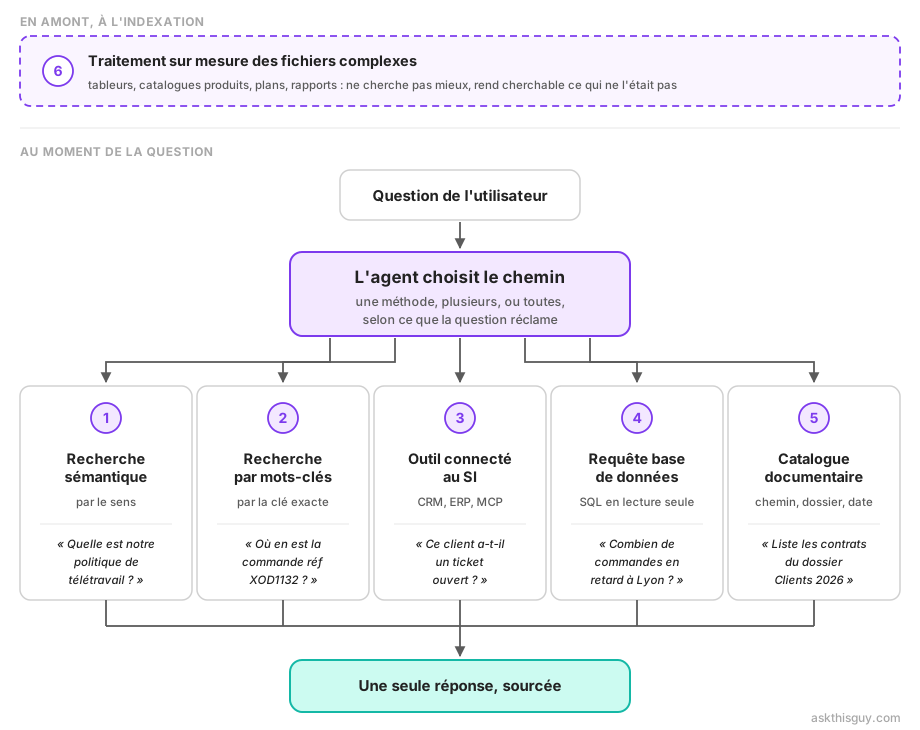
Diagram of the six complementary paths to find a piece of information: upstream, at indexing time, tailored processing of complex files; then, at question time, semantic search, keyword search, the connected business tool, the database query and the document catalog query, all used by a single agent to produce one sourced answer
When a single question calls for several paths
My six examples have one flaw: they are too clean. Each points at its own path almost by itself.
An operations director asks something more like this:
"Are we meeting our commitments with Durand this year?"
Nothing in that sentence says where to look, which commitments are meant, or over what period. None of the six paths is enough on its own, and you cannot decide in advance in which order to take them.
The assistant first has to find what sets out the commitment: a contract, an amendment, a service agreement. Path 1, plus path 5 if the right file has to be located in the right folder tree. There it reads the thresholds, response time, number of included interventions, availability rate. And it learns along the way that the period runs on the calendar year, not on a rolling twelve months.
Only then does it know what to ask the ticketing tool. Path 3 fires, with a filter it has just discovered in the contract. If the volumes sit in a database rather than in ticketing, path 4 takes over. Then it compares, and it answers.
The second query could not have been written before reading the result of the first. An agent runs an investigation where a simple router merely dispatches: it weighs what it gets back and decides whether it knows enough to answer, or whether it should go looking again. The principle is detailed in our article on agentic RAG.
Two consequences, usually discovered too late. First, it has to know when to stop: an investigation burns time and tokens, and without limits on the number of round trips the system becomes slow and expensive, hence unusable even when its answers are good. Second, it has to be traceable. When an answer comes out of four calls to three sources, the user must be able to check where each element came from. Without citations nobody grants their trust, and an answer you do not trust is worth nothing.
What you probably have today
The test is simple. Take the six questions from the start and put them to the assistant you already use.
With Copilot, you are well served on questions 1, 2 and 5, as long as the information sits in Microsoft 365. You stop at the boundary of your business systems and your databases: questions 3 and 4 go unanswered, or come back as an approximation. And your unusual business files are treated like ordinary files.
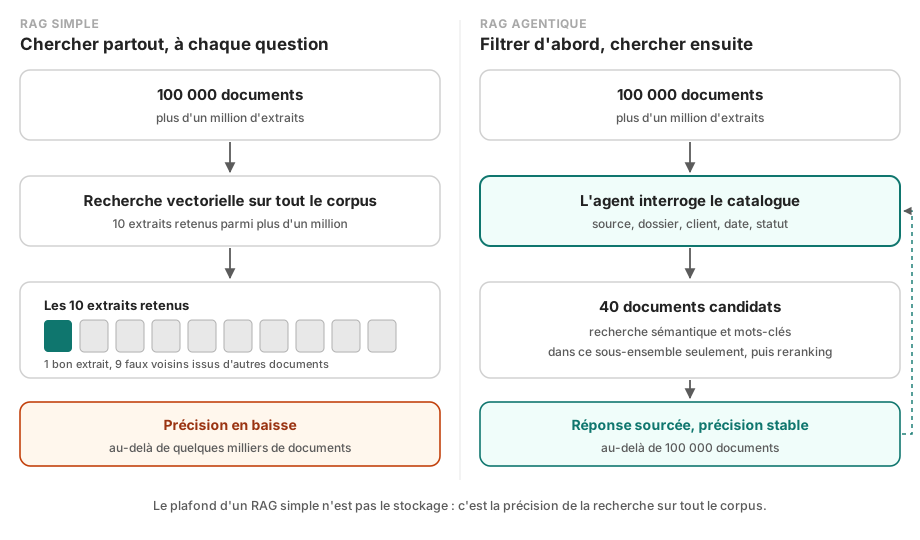
With a RAG built in-house, you almost certainly have path 1, sometimes path 2. That is the natural route, vector search is what you wire up first and what makes a good demo. The other paths need integrations, access rights and operations, so work after the POC. It is also why it plateaus at a few thousand documents.
With a classic enterprise search engine, you have paths 2 and 5, with filters. It is fast and solid, but you have to know what to type. Nobody finds the remote work policy by searching "remote work" when the document says "working from home".
None of these tools is bad, and I want to be clear about that. They cover part of the need, properly. The problem is that your teams discover the other part by running into it, question after question, and they soon stop asking.
The Ask This Guy approach
We took the problem from the other end. Rather than optimising one search method, we wired up five, plus a sixth that prepares the ground, and we put an agent on top.
The agent decides. It rephrases the question, picks the path or paths to take, reads what comes back, and judges whether it knows enough. If not, it goes again, better targeted, with what it has just learned. On the Durand case above, it chains documents then ticketing without anyone telling it in which order. And if the contract lives in an in-house tracking spreadsheet, it is the tailored processing, configured once, that let it read the file properly.
The documentation covers the mechanics. Every element of the answer points back to its source, whichever path found it.
On the user side, none of this needs to be known. They ask their question in plain language. That is the least we can do: asking a salesperson to choose between "semantic search" and "SQL query" before typing a sentence would be handing them an engineering problem.
Frequently asked questions about hybrid search
What is hybrid search?
Hybrid search means combining several complementary search methods instead of relying on one. Strictly speaking, it pairs semantic search (by meaning, through embeddings) with keyword search (by exact match). More broadly, it also covers calls to business tools, database queries and document catalog queries, to handle questions whose answer is in no document at all. On top of that sits an upstream path: tailored processing of complex files, which makes spreadsheets and catalogs usable when standard chunking would turn them into noise.
What is the difference between semantic search and keyword search?
Semantic search compares meaning: it finds "remote working arrangements" from the question "can we work from home?". Keyword search compares character strings: it finds the exact reference XOD1132 or the name JP Dupont, which semantic search misses because those strings carry no meaning of their own. Both are needed, because a company handles as many internal references as it does concepts.
Why is vector search alone not enough?
Because a large share of enterprise questions involve identifiers with no semantic value (product references, project codes, client names), live data held in business systems, figures that have to be computed in a database, or the structure of the document base itself. It also fails on files where structure carries the meaning, such as spreadsheets, which text chunking reduces to strings of cells. None of these cases is handled properly by vector proximity, which nonetheless remains the only mechanism in many RAG projects.
How does an assistant know which search method to use?
The agent decides, based on how the question is phrased and on the descriptions of the tools available to it. A conceptual question triggers semantic search, an explicit reference triggers keyword search, a counting request triggers a catalog query. On complex questions it chains several of them, using the result of the first to formulate the next, until it judges that it knows enough to answer.
Why does a classic RAG handle Excel files badly?
Because in a spreadsheet, meaning is carried by structure as much as by text. A cell means nothing without its column header, its unit and its reference row. Chunking into pieces of text, which works well on a contract or a procedure, produces strings of values with no context here. You need processing adapted to the format, which reconstructs what each column means before indexing.
Conclusion
Everyone can answer the easy question, the one whose answer sits in a well-written paragraph of a well-filed document. An assistant is judged on the other five: the ones where the information is somewhere else, where it does not yet exist as text, or where it sleeps in a file nobody has bothered to make readable.
If you want to see how your own questions fare, the ones your teams actually ask, book a demo: we will start from your real sources. The approach is detailed on the turnkey enterprise RAG page, and querying your databases on Talk to Data.