
Internal company chatbot: how to scope the project right
Internal company chatbot: what it is really for, how it differs from a website chatbot, the classic pitfalls and the conditions for success.
In most companies, the information exists. It is written down, somewhere. The problem is not that it is missing, it is that nobody knows where it is, or that the only person who knows is on leave.
So employees do what they have always done: they ask a colleague. A question that would have taken thirty seconds with an effective search engine ties up two people for ten minutes, and the answer they get is not necessarily the current version.
That is the problem an internal company chatbot sets out to solve. But you have to be clear about what you are building: half the projects carrying that name actually produce something else.
Internal chatbot and website chatbot: same tool, two different projects
This is the first confusion to clear up, because it drives everything else: budget, corpus, success criteria.
A website chatbot talks to your visitors. It answers public questions, qualifies prospects, routes people to a salesperson. Its corpus is small and controlled, its answers are validated in advance, and the main risk is commercial: a bad answer loses a lead.
An internal chatbot talks to your employees. It answers from your procedures, contracts, meeting notes, technical documentation and HR policies. Its corpus is large, heterogeneous, badly organised, and above all subject to differentiated access rights. The main risk is confidentiality: a bad answer exposes a document to someone who should not have seen it.
| Website chatbot | Internal chatbot | |
|---|---|---|
| Audience | Visitors, prospects | Employees |
| Corpus | Small, public, curated | Large, private, heterogeneous |
| Access rights | Uniform | Differentiated per person |
| Objective | Convert, route | Find, decide, save time |
| Main risk | Lost revenue | Internal information leak |
| Success metric | Qualified leads | Search time avoided |
The technical architecture, on the other hand, can perfectly well be shared: same engine, same RAG foundation, same interface. We even recommend using the same tool for both, to avoid maintaining and administering two platforms. What must differ is the document corpus, the instructions given to the model and the monitoring you put in place. A vendor proposing the same corpus and the same instructions for both use cases, however, has misunderstood the project. We cover the first case in our article on website chatbots and lead generation.
What makes an internal chatbot work: RAG
A general-purpose language model knows the world, not your company. Asked about your expense policy, it will produce a plausible and wrong answer, which is the worst possible outcome.
The technical answer is called RAG (Retrieval Augmented Generation). On every question, the system first searches for the relevant passages in your own sources, then hands them to the model, which writes its answer from those excerpts and cites where they came from. The model "knows" nothing about your company: it reads, on demand, whatever you give it to read.
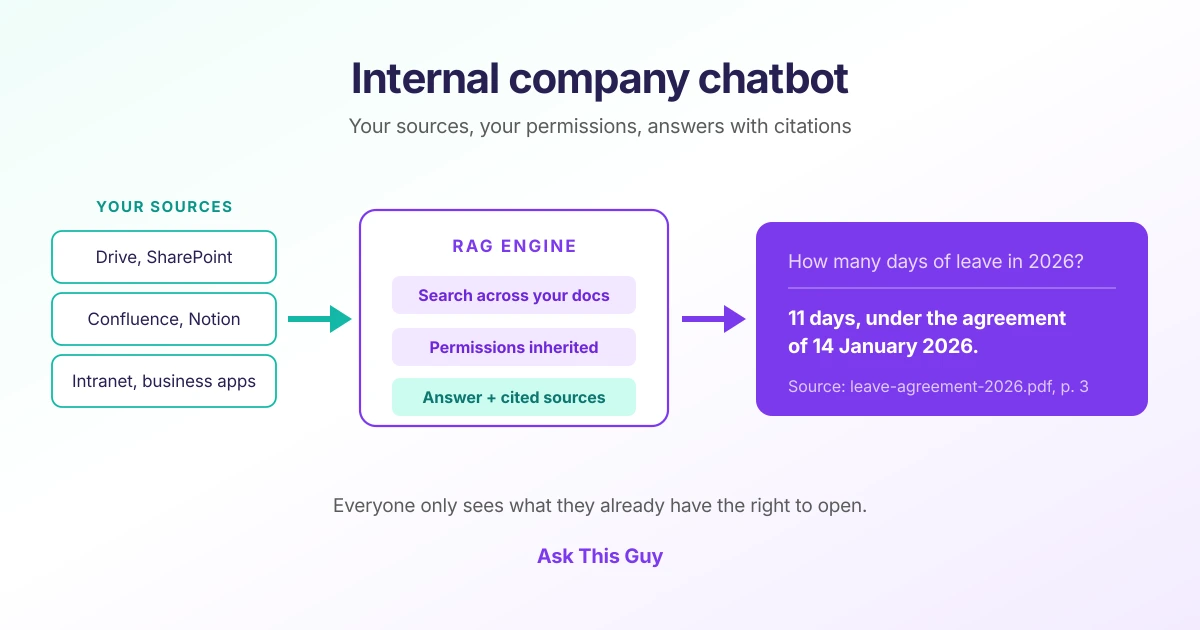 Diagram of an internal company chatbot: sources (Drive, SharePoint, Confluence, Notion, intranet) feed a RAG engine that applies each person's permissions and answers by citing the 2026 leave agreement
We detail the mechanism in our RAG guide. Three practical consequences are worth keeping in mind here:
- Answer quality depends first on ingestion, not on the model. A scanned PDF that is badly converted or badly chunked will produce mediocre answers with any LLM.
- Cited sources are not a display detail. They are what lets the user verify, and therefore trust. An internal chatbot without citations will not be used for long.
- Access rights must be applied at retrieval, not at display time. If the system finds a confidential document and then decides not to show it, the information has already leaked into the generated answer.
Widening what each person actually consults
The least anticipated benefit is often the one users value most: RAG widens the corpus each employee actually works with. Day to day, everyone uses the few dozen documents they know and keeps returning to the same folders. The rest exists but is never opened: the legal note written by another entity, the report from a neighbouring project, the product sheet updated last month. An assistant that searches the whole corpus the user is entitled to brings those documents into the answer, with their source. People discover what they did not know they should look for.
The same reasoning applies to data. Some of the useful information does not live in documents but in the CRM, the ERP, the ticketing system or the project management tool, which most employees never open: too many screens, too many access requests, too much time for a single question. By connecting the assistant to those systems through a database query, tailored tools or MCP servers, a single answer can combine the written procedure and the real state of the customer account, without anyone having to open the ERP.
The use cases that pay for an internal chatbot
The projects that last share one trait: they target frequent, written and repetitive questions.
Support for shared services
HR, legal, procurement, IT. These are the teams most often asked questions whose answer already exists in a document. Leave, expenses, purchasing procedure, standard clauses, access resets: an internal chatbot absorbs a meaningful share of that flow and gives time back to teams that are structurally understaffed.
Onboarding new joiners
An employee's first three months are a long series of questions they do not always dare to ask. An internal assistant shortens the path to autonomy without tying up a mentor full time.
Technical and product documentation
Engineering, presales, support. Finding the right section of the docs, the applicable version of a specification, or the history of a technical decision inside a wiki of several thousand pages.
Answering RFPs and questionnaires
Security, compliance, customer references: the same questions come back, and the answers exist in earlier documents. This is one of the uses where time saved is easiest to quantify.
Project memory
Meeting notes, decisions, trade-offs. "Why did we choose that supplier in 2024?" is a question a well-fed internal chatbot answers better than collective memory does.
Five mistakes that sink an internal chatbot project
1. Connecting everything at once. The "let's index the whole information system" ambition produces an assistant that is mediocre everywhere. Start with a perimeter where you can judge answer quality: one domain, one team, one corpus.
2. Leaving access rights until acceptance testing. This is the topic that kills projects late in the game, when IT discovers the assistant answers everyone from everything. Permissions must be inherited from the sources from the design stage.
3. Neglecting document quality. Three versions of the same procedure, two of them obsolete, and the assistant will confidently cite the wrong one. An internal chatbot project is almost always also a document housekeeping project.
4. Not measuring. Two complementary measurements are almost always missing. The first is a reference set of questions replayed on every model change or new source: without it, you will not know whether the assistant is improving or degrading. That is what agent evaluation is for. The second is user feedback: thumbs up or down, free-text comments, sentiment automatically detected in conversations, all tracked over time and broken down by theme or tag to spot the topics that are slipping. That is what our Insights console makes visible.
5. Neglecting the user experience. An assistant that is excellent on paper but that nobody opens a second time is useless. Adoption comes down to very concrete things: an interface people use without training or a manual, and answers that arrive in a few seconds. An employee who has to wait, who has to learn how to phrase questions, or who does not know what to do with the answer goes back to searching the drive alone, and does not come back.
Build or buy?
Building an internal chatbot from a model and a vector database is easy for a demo. That is what makes the subject deceptive.
What costs money is everything else: connectors to Google Drive, SharePoint, Confluence and Notion, incremental synchronisation, correct extraction of tables and scanned PDFs, permission propagation, hybrid search, reliable source citation, quality evaluation, cost monitoring and user support. We detail those pitfalls in our article on classic mistakes when taking RAG to production.
A full internal build is counted in person-months and maintained indefinitely. A platform that already provides those building blocks typically reduces total cost of ownership by around 80% compared with an end-to-end internal project, and above all shortens the time to first real usage.
The real decision criterion is not technical: it is whether the value of your project sits in the plumbing or in the fit with your business. In almost every case, it sits in the second.
What about sovereignty?
An internal chatbot reads your most sensitive documents: contracts, HR files, financial material, intellectual property. Where that content is processed, and by whom, is not a theoretical question.
Three things to check before signing:
- Where documents, vector indexes, logs and backups are hosted.
- Which model providers are called, from which jurisdiction, and whether you can restrict processing to European providers only.
- What is actually sent to the model on each question: the relevant excerpts, or the whole document.
We have devoted a full page to those trade-offs: sovereign AI, definition and criteria.
The Ask This Guy approach
We deploy internal assistants on a platform that already provides connectors to your sources, document ingestion, hybrid search, permission inheritance, source citation and monitoring. The custom work then goes into your vocabulary, your rules and your use cases, not into rebuilding a technical stack.
Three principles guide our deployments:
- A narrow perimeter first, chosen so that quality can be judged within the first few weeks.
- Permissions inherited from your sources, so the assistant never shows an employee anything they could not open themselves.
- European hosting and a configurable AI policy, up to an on-premise option depending on your constraints.
Our turnkey enterprise RAG page details the available connectors and how a deployment unfolds.
Frequently asked questions about internal company chatbots
What is an internal company chatbot?
An internal chatbot is a conversational assistant reserved for a company's employees. Connected to internal document sources (drives, intranet, wikis, business tools), it answers work questions from those documents and cites its sources, rather than relying on general knowledge scraped from the web.
What is the difference between an internal chatbot and a website chatbot?
A website chatbot addresses external visitors, on a small public corpus, with a commercial objective. An internal chatbot addresses employees, on a large private corpus, with access rights that differ per person. The tool can be the same, but the corpus, the instructions, the risks and the success criteria are completely different.
Can an internal chatbot respect each employee's access rights?
Yes, provided permissions are inherited from the sources and applied at retrieval time, rather than filtered afterwards at display time. Each user should only get answers built from documents they could open themselves in the original tool.
How long does it take to deploy an internal chatbot?
A few days for a first perimeter on an existing platform with standard connectors. A few weeks if the sources are heterogeneous, if document quality needs cleaning up, or if custom connectors have to be built. A full internal build is counted in months.
Which sources can an internal chatbot draw on?
The usual ones are Google Drive, SharePoint and OneDrive, Confluence, Notion, Slack, websites and intranets, file or FTP shares, and business databases. What matters is not the number of connectors but the quality of ingestion: chunking, table extraction, handling of scanned PDFs and synchronisation of updates.
What is the return on investment of an internal chatbot?
It is measured in search time avoided and in interruptions avoided for shared-service teams. The most reliable approach is to pick a narrow perimeter, measure the number of questions handled and the share of answers rated useful, then expand on that basis rather than on a theoretical estimate made before you started.
What to take away
An internal company chatbot is not a website chatbot moved behind authentication. It is a document retrieval project with differentiated access rights, whose success rests on ingestion, permissions and source citation far more than on the choice of model.
Start small, on a perimeter where you can judge quality. Measure. Then expand. Projects that fail are almost always the ones that tried to index everything before proving anything.
Have a corpus in mind and a team losing time searching? Book a demo: we will quickly tell you what can be connected, how long it takes, and at what level of quality.